Introduction
When choosing a retail system, one of the biggest decisions is the deployment model: cloud-based or desktop (locally installed)? Both process sales and manage your business — but they do it differently, with different cost structures, different reliability profiles, and different feature sets.
This comparison is written specifically for Sri Lankan business owners in 2026, factoring in local internet reliability, business growth patterns, and real feedback from businesses running our POS system in both cloud and desktop configurations.
What Is a Cloud POS System?
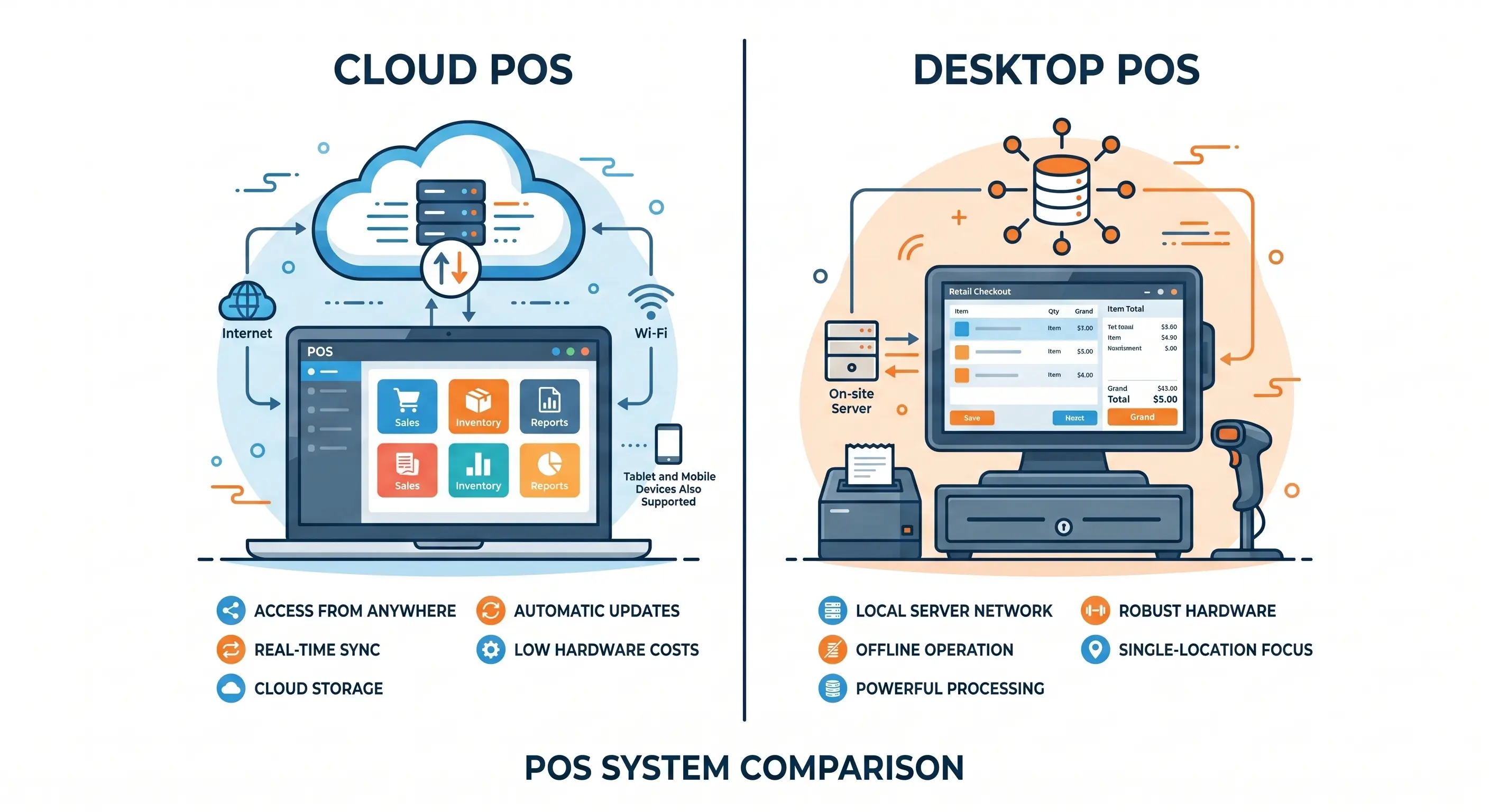
A cloud billing system stores all your business data — products, inventory, customers, transactions, employees — on secure remote servers accessed via the internet. The software runs in a browser or dedicated app, and your data is accessible from any authorized device, anywhere in the world.
Key characteristics:
- Data stored and backed up automatically in the cloud
- Accessible from phones, tablets, and computers remotely
- Automatic software updates without manual installation
- Native multi-branch support
- Typically lower upfront cost with ongoing subscription
- Requires internet connectivity (good systems include offline fallback)
What Is a Desktop POS System?
A desktop sales system has software installed directly on a local PC or checkout terminal. All data is stored on the local device or a local server on your premises. It works completely independently of the internet — making it highly reliable for single-location businesses in areas with unstable connectivity.
Key characteristics:
- Works fully offline — no internet dependency
- Data stored locally (with optional manual backup)
- Higher upfront cost, typically one-time license fee
- Fast performance — no network latency
- Limited remote access capability
- Manual updates required
Head-to-Head Comparison: Cloud POS vs Desktop POS
| Feature | Cloud POS | Desktop POS |
|---|---|---|
| Internet required | Yes (offline fallback recommended) | No |
| Remote access | ✓ Any device, anywhere | ✗ Local only |
| Multi-branch management | ✓ Native support | Limited / complex |
| Data backup | ✓ Automatic cloud backup | Manual backup required |
| Software updates | ✓ Automatic | Manual installation |
| Upfront cost | Lower | Higher |
| Ongoing fees | Monthly/annual subscription | Minimal after purchase |
| Speed during outage | Depends on offline mode quality | ✓ Always fast |
| Hardware flexibility | Any device (tablet, phone, PC) | Dedicated terminal |
| Data loss risk | Very low (cloud redundancy) | Higher (local only) |
| Best for | Multi-branch, growing business | Single location, stable environment |
When to Choose Cloud POS
Cloud store is the right choice when:
- You have or plan to open multiple branches — Cloud business connects all locations to one database, giving you real-time cross-branch visibility without any manual data consolidation.
- You want to monitor your business remotely — Check today's sales, current inventory levels, and cashier performance from your phone — from anywhere, at any time.
- You want automatic backups — A hardware failure at your shop cannot destroy your business data when it's stored in the cloud.
- You want lower upfront investment — Cloud retail is generally more accessible for new businesses that prefer to spread costs over time.
- You need a scalable solution that grows with you — Add new branches, users, and features without replacing your entire system.
When to Choose Desktop POS
Desktop billing is the right choice when:
- Your location has unreliable internet — Some areas of Sri Lanka still experience connectivity issues. A desktop sales never slows down due to internet problems.
- You want a one-time software payment — No ongoing subscription fees — pay once, own indefinitely.
- You run a high-volume single location — A supermarket processing hundreds of transactions per hour benefits from the consistent speed of a local system.
- You prefer full data control on-premises — Some business owners prefer keeping all data under their direct control rather than on third-party servers.
The Best of Both Worlds: Hybrid Cloud-Desktop POS
For most Sri Lankan businesses, neither pure cloud nor pure desktop is optimal. The ideal solution is a hybrid system — locally installed software that works fully offline when the internet is unavailable, and automatically syncs to the cloud when connected.
This approach gives you:
- Offline reliability — never stops working during internet outages
- Cloud access — check data remotely when connected
- Automatic cloud backup — data is always safe
- Multi-branch sync — when connected, all branches update in real time
possystem.lk's Desktop Cloudashier is exactly this hybrid model — local performance with cloud connectivity, designed specifically for Sri Lankan business conditions.
Cost Comparison Over 3 Years
| Cost Factor | Cloud POS (3 yr) | Desktop POS (3 yr) |
|---|---|---|
| Software | Rs. 36,000 – 120,000 (subscription) | Rs. 39,000 – 60,000 (one-time) |
| Hardware | Rs. 30,000 – 80,000 | Rs. 60,000 – 150,000 |
| Support | Usually included | Annual fee may apply |
| Updates | Free (auto) | May be chargeable |
| Data recovery risk | Low | Medium (local backup dependency) |
Use our checkout price calculator for a custom estimate based on your specific setup.
Recommendation for Sri Lankan Businesses in 2026
- Single location, stable internet: Cloud store for remote access and auto-backup
- Single location, unreliable internet: Hybrid Desktop-Cloud for reliability + cloud benefits
- Multi-branch or growing: Cloud POS is essential for centralized management
- Restaurant or cafe: Cloud with offline mode — service cannot stop due to connectivity
Conclusion
Both cloud and desktop POS systems have merit — the right choice depends on your business model, location connectivity, and growth plans. In 2026, the trend is firmly toward cloud-enabled systems, with hybrid offline capability being the practical standard for Sri Lanka's varied connectivity landscape.
Explore cloud POS options, desktop POS systems, and hybrid solutions at possystem.lk, or book a consultation to determine the best fit for your business.