Introduction
When setting up a new business or upgrading your current billing process, one of the first decisions you face is: should you use a cash register or a retail system? At first glance, both process sales — but the differences in capability, cost-effectiveness, and long-term value are enormous.
This guide gives you a clear, honest comparison so you can make the right choice for your business today — not regret a wrong one in six months, drawing on what we've learned building possystem.lk for Sri Lankan businesses.
What Is a Cash Register?
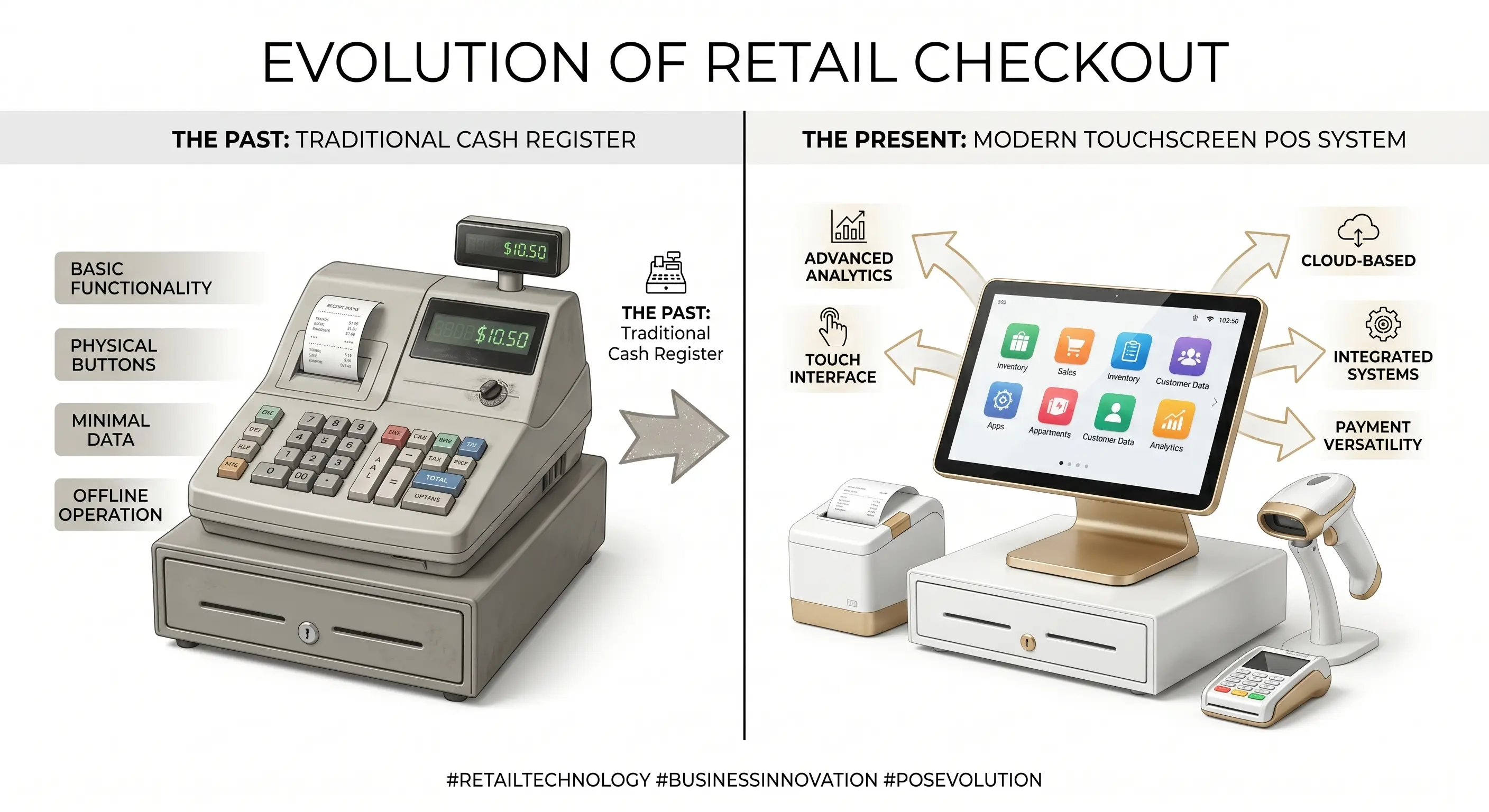
A cash register is a mechanical or basic electronic device designed to do one thing: record sales transactions and store cash. Traditional cash registers display a running total, print basic receipts, and keep a count of cash in the drawer.
Modern electronic cash registers (ECR) may add limited features such as basic product codes and departmental totals — but they remain fundamentally limited to recording what was sold and storing the money.
What a cash register cannot do:
- Track inventory levels in real time
- Generate profit and loss reports
- Identify your best-selling products
- Manage employee shifts and performance
- Support multi-branch operations
- Integrate with supplier or accounting systems
- Back up data to the cloud
What Is a Modern POS System?
A POS system (Point of Sale system) is a complete business management platform. It processes payments AND manages every aspect of your daily business operations. Think of it as a cash register that grew up — with a full suite of business intelligence built in.
A point of sale solution gives you:
- Real-time inventory management across all products
- Cashier-level accountability and shift tracking
- Automated daily, weekly, and monthly sales reports
- Customer loyalty programs and purchase history
- Multi-branch data synchronization
- Remote monitoring from your phone or laptop
- Automatic cloud backup of all business data
POS System vs Cash Register: Head-to-Head Comparison
| Feature | Cash Register | POS System |
|---|---|---|
| Sales processing | ✓ | ✓ |
| Cash storage | ✓ | ✓ |
| Receipt printing | Basic | Detailed + digital |
| Real-time inventory tracking | ✗ | ✓ |
| Sales reports & analytics | ✗ | ✓ |
| Employee management | ✗ | ✓ |
| Customer loyalty programs | ✗ | ✓ |
| Multi-branch support | ✗ | ✓ |
| Cloud data backup | ✗ | ✓ |
| Barcode scanning | Limited | ✓ Full support |
| Automatic tax calculation | Manual | Automatic |
| Discount & promotion management | ✗ | ✓ |
| Integration with accounting | ✗ | ✓ |
| Remote monitoring | ✗ | ✓ |
| Data loss risk | High (no backup) | Low (cloud backup) |
Cost Comparison: Cash Register vs POS System
Many business owners choose cash registers thinking they are the cheaper option. But when you factor in what you're losing — in stock shrinkage, billing errors, and time spent on manual reporting — the true cost of a cash register is much higher.
| Cost Factor | Cash Register | POS System |
|---|---|---|
| Upfront cost | Rs. 5,000 – 15,000 | From Rs. 39,000 |
| Monthly stock loss (average) | Rs. 15,000 – 30,000 | Rs. 3,000 – 6,000 |
| Manual reporting time/week | 8 – 12 hours | Under 30 minutes |
| Billing error losses/month | Rs. 3,000 – 10,000 | Near zero |
| Data loss risk cost | High | Minimal |
At Rs. 39,000 upfront, a POS system typically saves more than its cost within the first month through inventory control and error reduction alone.
5 Clear Signs You Need to Upgrade from Cash Register to POS
- You're losing track of stock. If you regularly find discrepancies between what you think you have and what's actually on your shelves, a POS system with automatic inventory deduction will solve this immediately.
- End-of-day reconciliation takes too long. If balancing the till takes more than 30 minutes, you're wasting valuable time that a POS system would automate.
- You can't identify your best sellers. Without sales data, you're buying stock on guesswork. A POS shows you exactly which products drive your revenue.
- You're opening a second branch. Managing two locations with separate cash registers means zero visibility across your business. A cloud POS connects everything.
- Customers complain about slow checkout. A POS with barcode scanning cuts checkout time by up to 60% — shorter queues mean more customers served and better reviews.
When a Cash Register Might Be Enough
To be fair, a basic cash register may suffice if:
- You sell fewer than 10 products
- You have one employee and handle all sales yourself
- You do not need reports or inventory tracking
- Your daily transaction volume is very low (fewer than 20 sales/day)
However, most businesses outgrow these conditions within months of opening.
The Verdict: Why POS Wins for Growing Businesses
If your business is selling, growing, and serving customers — a POS system is the smarter investment. The data, control, and automation it provides give you a competitive advantage that no cash register can match.
Explore our POS hardware bundles, check our pricing plans, or start with our Android POS system — an affordable entry point that scales with your business.
Not sure which system is right for you? Read our 10-step POS buying checklist or contact our team for a free consultation.
Conclusion
A cash register is a tool. A POS system is a business asset. While both process sales, only a POS system gives you the data, automation, and control needed to run a profitable, scalable business in 2026. The upgrade cost is small — the return is significant and long-lasting.