TRYCAM Camera Rentals — Complete Equipment Rental Management
TRYCAM Camera Rentals is an integrated web-based equipment rental management and point-of-sale system built for film, photography, production, and equipment-hire businesses. It brings the complete rental lifecycle into one operational system: customers, reservations, equipment availability, barcode-based issue and return, security deposits, invoices, payments, customer credit, damage inspection, maintenance, expenses, partner-shop transactions, notifications, and management reporting.
Why Choose TRYCAM Camera Rentals?
Standard retail software cannot handle high-value serial units, damage liability, or gear exchanges between rental partners. TRYCAM Camera Rentals solves these complex operational hurdles with specialized capabilities built specifically for camera and equipment rental businesses.
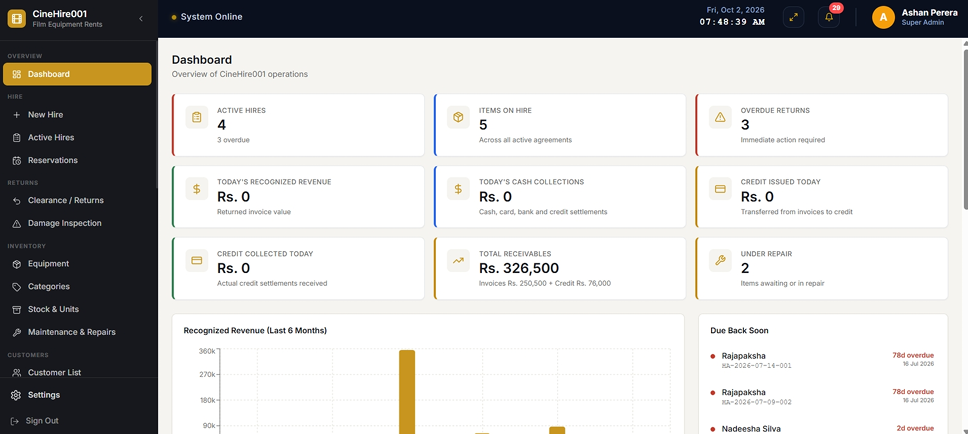
Operational Dashboard
Get a live overview of your entire rental business at a glance. The dashboard surfaces active hires, overdue returns, items under repair, recognized revenue, cash collections, receivables, credit activity, due-back items and recent damage — all in one operational control center.
- ⚡ Active hires, items on hire, overdue returns, repairs and due-back items shown in real time.
- ⚡ Today's recognized revenue and cash collections shown separately for accurate financial visibility.
- ⚡ Outstanding invoices, customer credit and due/overdue instalment alerts on the operations panel.
- ⚡ Six-month recognized-revenue trend chart for management reporting at a glance.
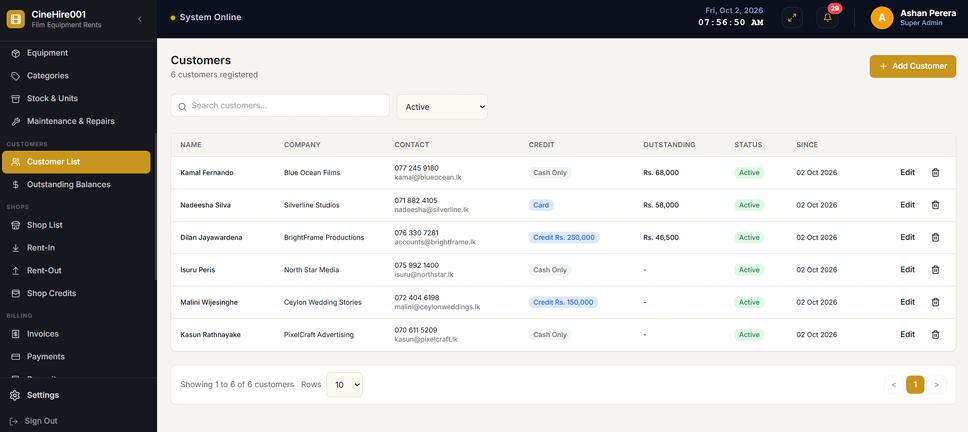
Customer Management
The Customers module is the central directory for individuals and businesses hiring from TRYCAM. A single customer profile stores contact, identity, company, status, notes, credit terms and limits with full hire, reservation, invoice, ledger and outstanding balance history.
- ⚡ Full contact, identity and company records with active/inactive status control.
- ⚡ Credit terms, credit limits and instalment schedules managed per customer.
- ⚡ Complete hire, reservation, invoice and ledger history accessible from the customer profile.
- ⚡ Outstanding balances and receivables consolidated per customer for debt visibility.
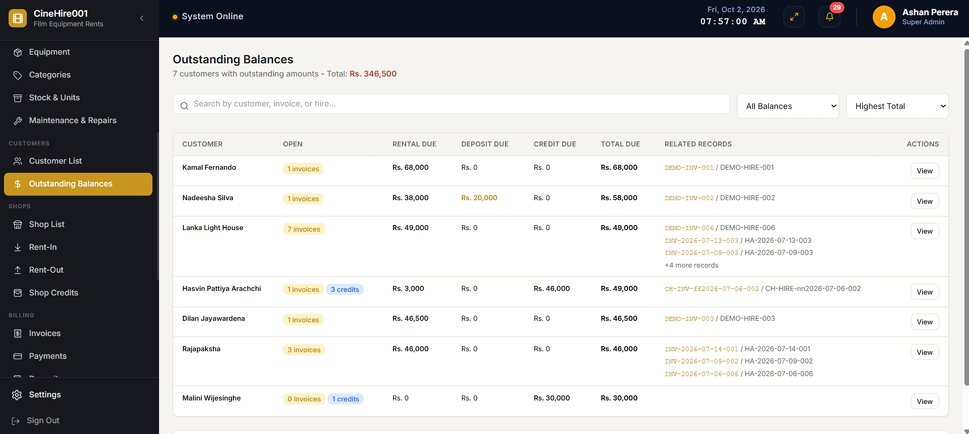
Outstanding Balances View
Consolidates rental, deposit and credit amounts by customer in a single receivables view. Staff can instantly identify who owes what, allowing targeted collection actions without manually reconciling multiple records.
- ⚡ Rental invoice balances, deposit balances and credit balances shown together per customer.
- ⚡ Total operational balance calculated per customer for immediate debt overview.
- ⚡ Linked directly from customer profiles and dashboard receivables indicators.
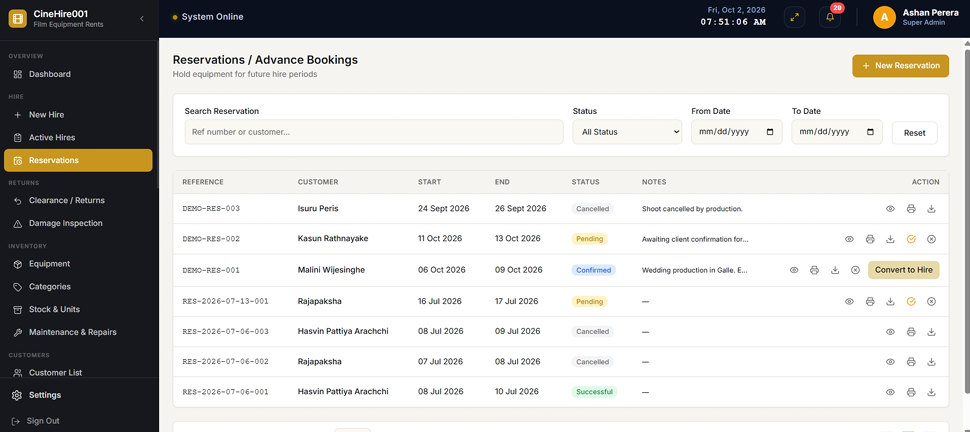
Reservations & Advance Bookings
Create date-based advance bookings for customers without accidental double-booking. The system checks overlapping reservations and live hires before accepting any planned allocation, and supports PDF document generation and direct conversion into a hire agreement.
- ⚡ Overlap detection prevents the same physical unit being booked into conflicting reservations.
- ⚡ Estimated charges and deposit calculated at reservation stage for customer planning.
- ⚡ Reservation-to-hire conversion pre-fills customer, date and product data to speed counter service.
- ⚡ PDF reservation documents generated for customer confirmation and agreement records.
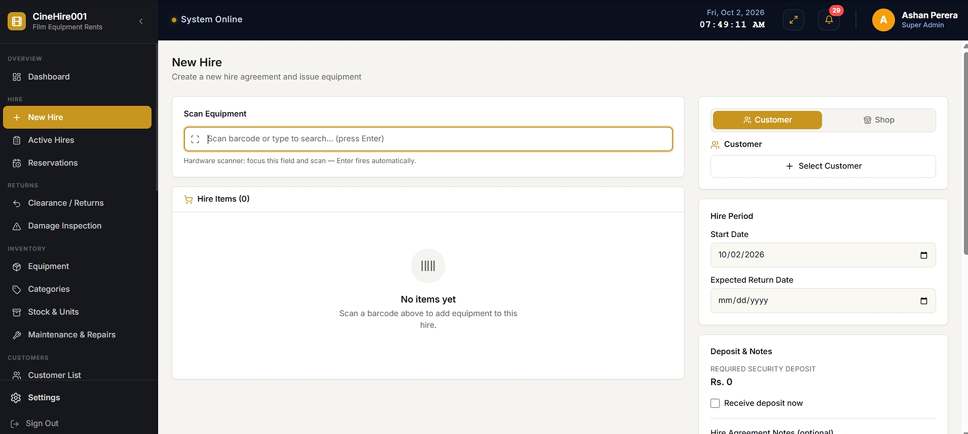
New Hire & Equipment Issue
The hire creation workflow selects customer or partner shop, hire period and physical units using barcode scanning. It validates availability conflicts, confirms equipment set contents and pre-existing condition, calculates authoritative rates and deposit, and records payments — all in one controlled handover process.
- ⚡ Barcode scanning to identify and add exact physical units during hire creation.
- ⚡ Availability conflict validation blocks double issuing the same unit.
- ⚡ Pre-existing damage and set component condition confirmed before handover.
- ⚡ Server-calculated authoritative daily, weekly or monthly rates with allowed discounts applied.
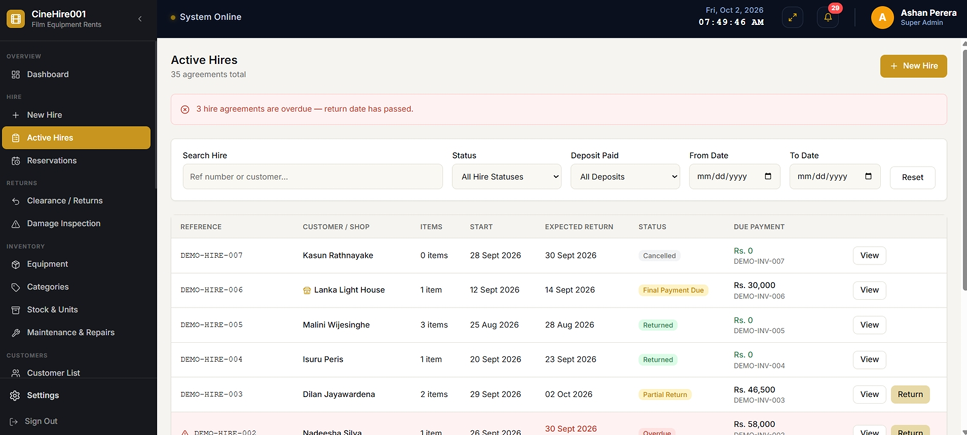
Active Hires Management
A searchable and filterable live view of all current hire agreements showing overdue status, issued items, component details, charges, deposits, invoices and damage records. Staff can immediately see what is outside the business and which items are overdue.
- ⚡ Live overdue status calculated and surfaced for immediate operational action.
- ⚡ Full hire detail: customer, period, issued equipment, components, charges and deposit status.
- ⚡ Searchable and filterable agreement list for fast hire lookup during counter operations.
- ⚡ Direct return action links from active hire view for faster clearance initiation.
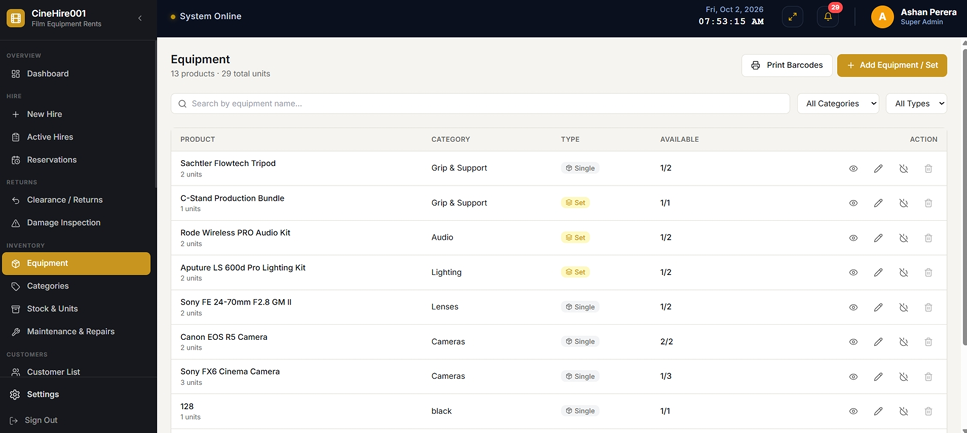
Equipment Catalogue & Inventory
The inventory module manages product categories, rental rates, deposit values, replacement values and physical unit records with serial numbers. It supports individually tracked equipment sets and bulk-quantity sets, and separates owned stock from temporary rent-in partner stock.
- ⚡ Daily, weekly and monthly rate tiers configurable per product type and category.
- ⚡ Replacement value and security deposit amount set per product for accurate customer liability.
- ⚡ Equipment sets tracked individually or by bulk quantity with full component status control.
- ⚡ Customer and partner-shop pricing fields separate for B2B rate differentiation.
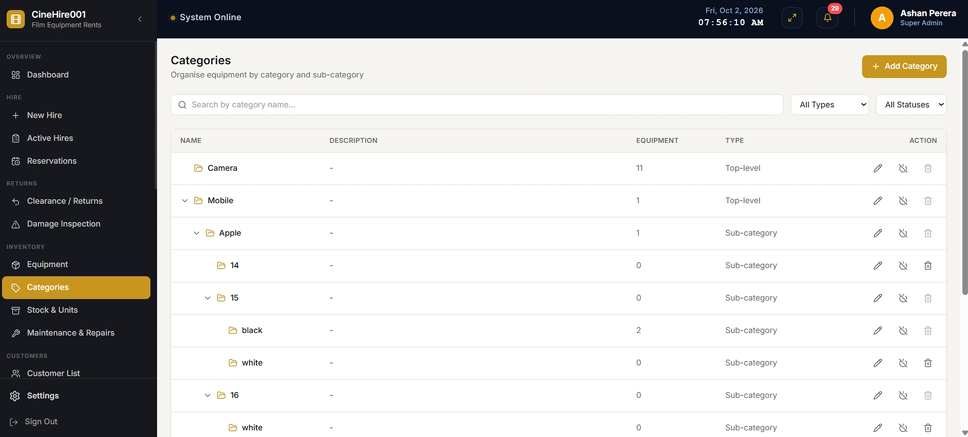
Category Hierarchy
Organize products and sub-categories using a structured hierarchy. Categories help staff locate equipment quickly, apply consistent pricing rules across product groups, and produce meaningful utilization and revenue reports by equipment type.
- ⚡ Parent and sub-category hierarchy for cameras, lenses, lights, accessories and production gear.
- ⚡ Category-level organization drives consistent product grouping and reporting.
- ⚡ Supports detailed utilization breakdowns per equipment category in management reports.
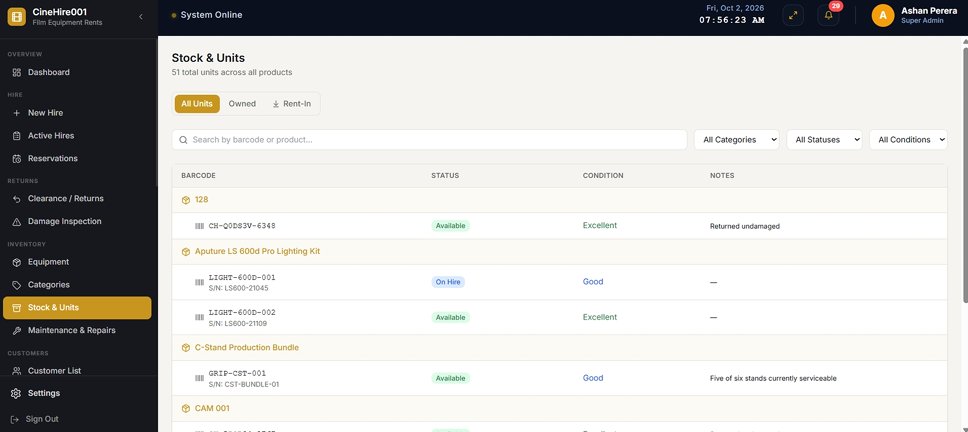
Stock & Units — Barcode & Serial Tracking
Every physical unit holds its own barcode, serial number, condition, condition history, source and current rental status. The scan workflow identifies equipment using a unit barcode, serial number, product barcode or set-component barcode and returns real-time availability and booking information.
- ⚡ Unit statuses: Available, Reserved, On Hire, Under Repair, Damaged and Retired — individually tracked.
- ⚡ Full condition history per unit documents every change in physical state over time.
- ⚡ Source tracking separates owned equipment from temporary rent-in partner shop stock.
- ⚡ Barcode scanning via standard USB keyboard-emulating scanner for inexpensive counter setup.
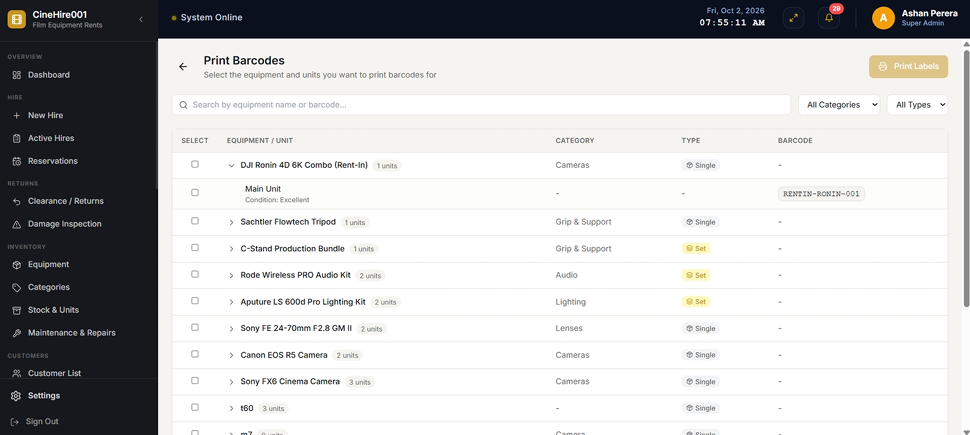
Barcode Label Printing
Generate and print barcode labels for products and individual physical units directly from the system. Printed labels enable faster barcode scanning at the counter during hire issue and return clearance, reducing manual data entry errors.
- ⚡ Print barcode labels for products and individual unit serial numbers.
- ⚡ Select specific units or product barcodes for label generation and printing.
- ⚡ Compatible with standard USB barcode scanner workflows for fast counter operations.
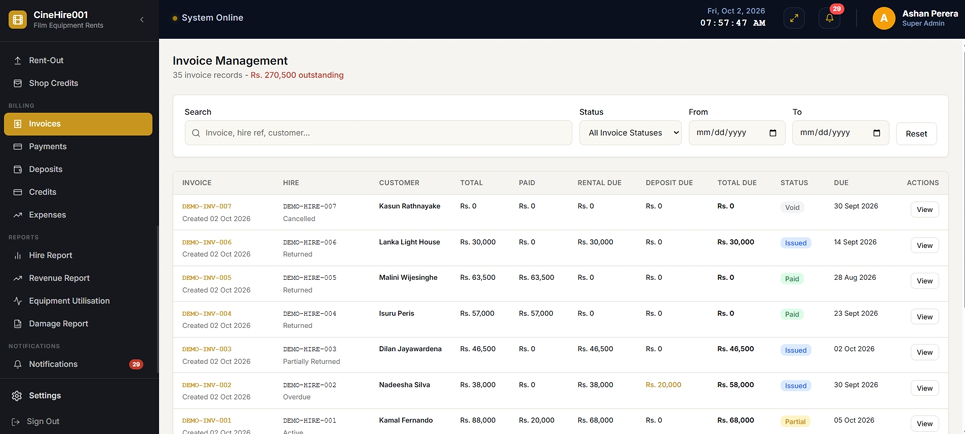
Invoice Management
Each hire agreement generates a linked invoice that itemizes rental charges, discounts, return damage, late fees and settlement status. Invoices expose amount paid, deposit held/applied/refunded, credit applied, rental balance and total operational balance with PDF download support.
- ⚡ Rental charges, discounts, late fees and damage charges itemized per agreement.
- ⚡ Settlement status tracks paid, partially paid and outstanding invoice positions.
- ⚡ Deposit applied and refunded amounts reflected directly on the invoice for transparent billing.
- ⚡ PDF invoice download for customer records and billing disputes.
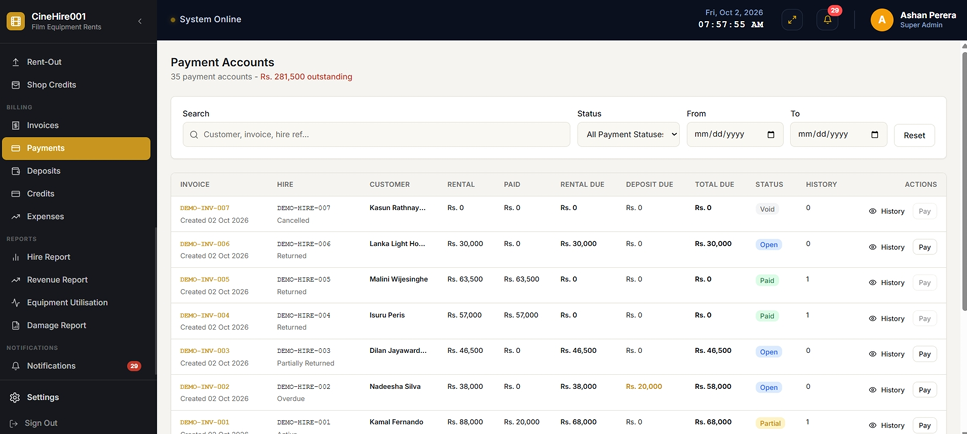
Payments & Payment Accounts
Supports cash, card, bank transfer, credit, and deposit application as payment methods. Payments can be split across multiple methods in a single settlement, and card and bank transfer entries require a reference number for auditability.
- ⚡ Multi-method split payments: cash, card, bank transfer, credit and deposit application.
- ⚡ Card and bank transfer references required for payment audit trail.
- ⚡ Invoice-linked payment status and full payment history per hire agreement.
- ⚡ Instalment payments for approved credit customers with schedule visibility.
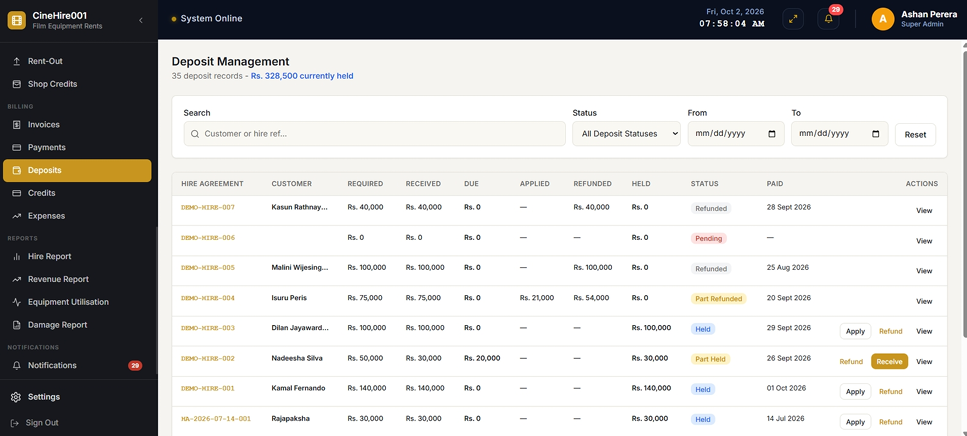
Security Deposit Ledger
Security deposits are managed in a dedicated ledger completely separate from rental revenue. Required, received, applied, refunded, held and outstanding deposit amounts are tracked distinctly so security money is never confused with earned income.
- ⚡ Dedicated deposit ledger separate from rental revenue for accurate financial reporting.
- ⚡ Deposit actions: Receive, Apply, Refund and Adjust with full transaction history.
- ⚡ Required vs. held deposit status visible per hire agreement at all times.
- ⚡ Deposit receipt, application and refund amounts limited by available balances.
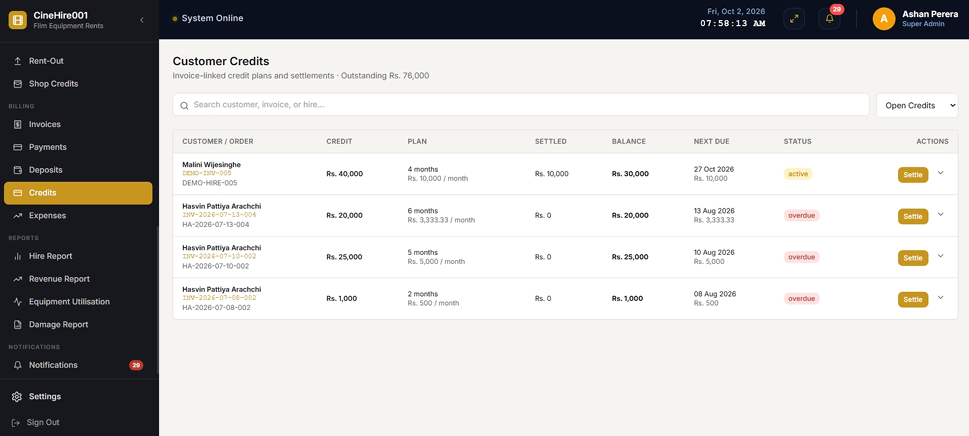
Customer Credit Accounts
Approved customers can use available credit to settle hire invoices. The system creates a separate credit account with term, monthly amount, due dates, instalment schedule and settlement history — keeping credit receivables intentionally separate from invoice receivables so the same debt is never counted twice.
- ⚡ Per-customer credit accounts with term, limit, monthly amount and instalment schedules.
- ⚡ Credit receivables kept separate from invoice receivables to prevent double-counting debt.
- ⚡ Instalment due dates and overdue status surfaced on dashboard and notifications.
- ⚡ Credit use limited by eligibility and unused credit limit for controlled lending.
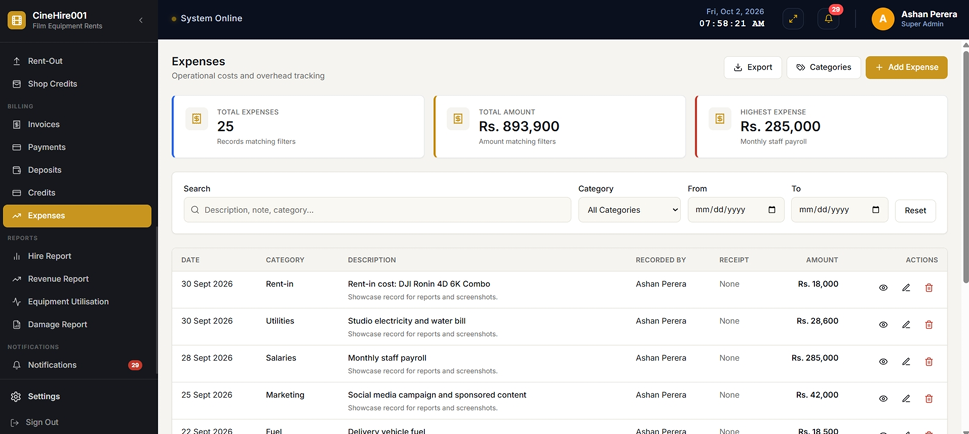
Expenses & Cost Tracking
Record categorized business expenses with receipt attachments and filter by date ranges. Expense summaries show monthly totals, recognized revenue, profit margins and highest expense categories for operational cost and profitability visibility.
- ⚡ Categorized expense recording with receipt file attachments per expense record.
- ⚡ Monthly expense and revenue summaries with net profit calculation.
- ⚡ Highest expense category identification for cost management decisions.
- ⚡ Export support: PDF, Excel and CSV-compatible formats for accountant handover.
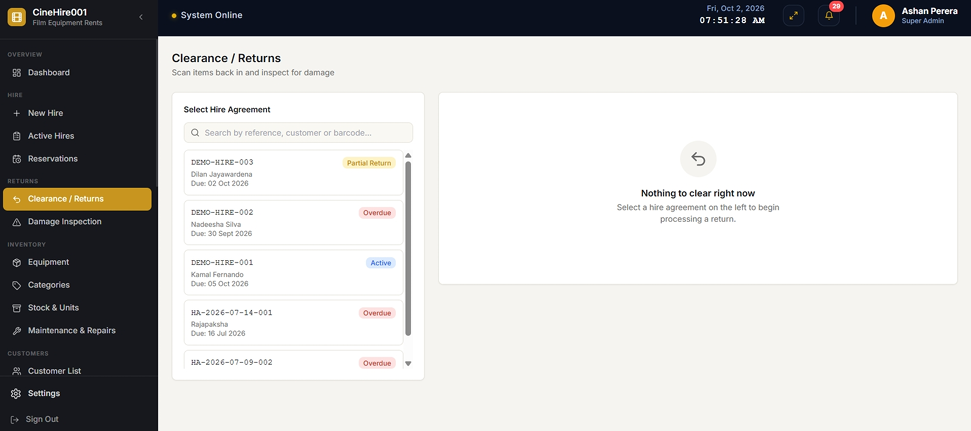
Returns & Clearance Inspection
TRYCAM Camera Rentals supports partial or full returns without forcing an agreement to close. Return condition, missing components, damage, damage charges, late fees and set-level damage are all recorded per item at clearance, and agreements remain open until every hire item is cleared.
- ⚡ Partial returns processed independently — remaining items stay on hire and unavailable.
- ⚡ Return condition and damage recorded separately from issue-stage damage notes.
- ⚡ Missing component, damage charge and late-return fee recorded per cleared item.
- ⚡ Cleared undamaged items immediately return to available stock for future hire.
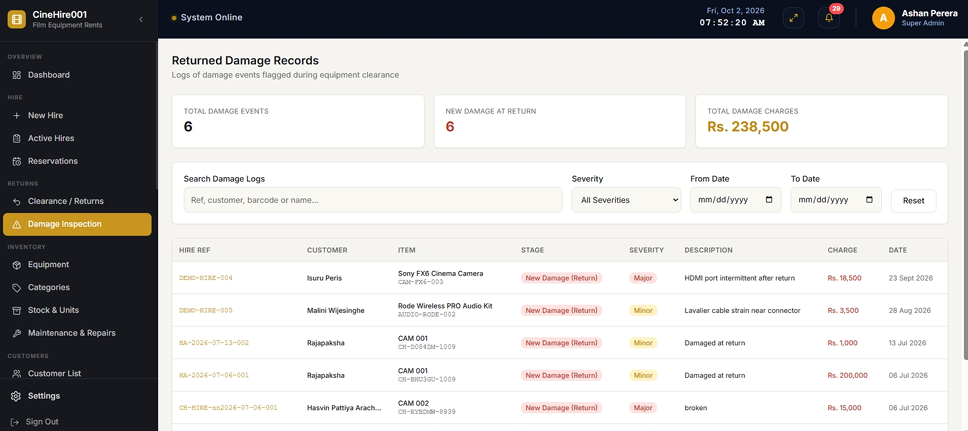
Damage Inspection & Accountability
Damage records preserve the exact stage at which each problem was observed — issue stage versus return stage. Only newly detected return-stage damage becomes a customer invoice charge, protecting the business from billing customers for pre-existing condition issues.
- ⚡ Issue-stage vs. return-stage damage tracked separately per unit for accurate accountability.
- ⚡ Damage severity classification: Minor, Moderate, Severe and Total Loss per affected unit.
- ⚡ Return-stage damage automatically routed to invoice and maintenance workflow.
- ⚡ Full damage event history with hire reference, customer, equipment and date for audit trail.
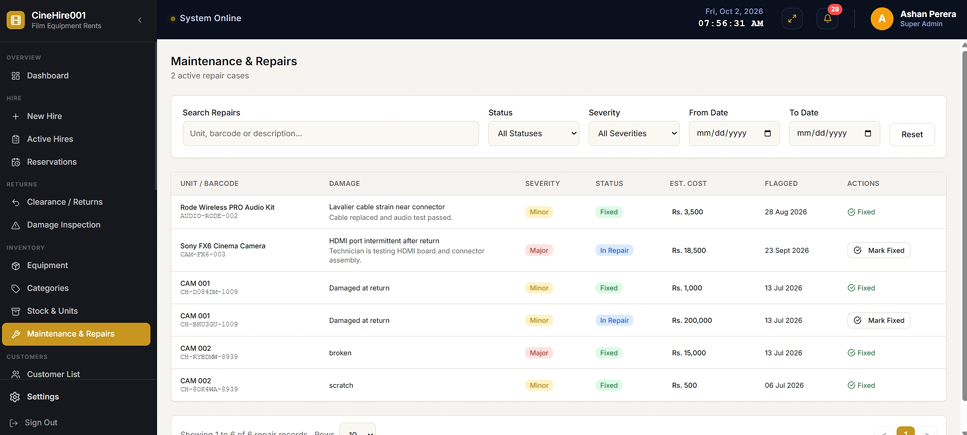
Maintenance & Repair Workflow
When a returned item is recorded as newly damaged, the system automatically creates a damage record and a maintenance record and places the affected unit into the repair workflow. Units cannot re-enter available stock until the maintenance workflow is completed and staff select the correct stock outcome.
- ⚡ Automatic maintenance ticket creation from return-stage damage — no manual entry required.
- ⚡ Repair tracking: severity, description, estimated cost, actual cost, assignee and completion date.
- ⚡ Unit locked from hire until repair completion and stock outcome selected by staff.
- ⚡ Repair outcomes: returned to stock, retired or written off, preserving full audit history.
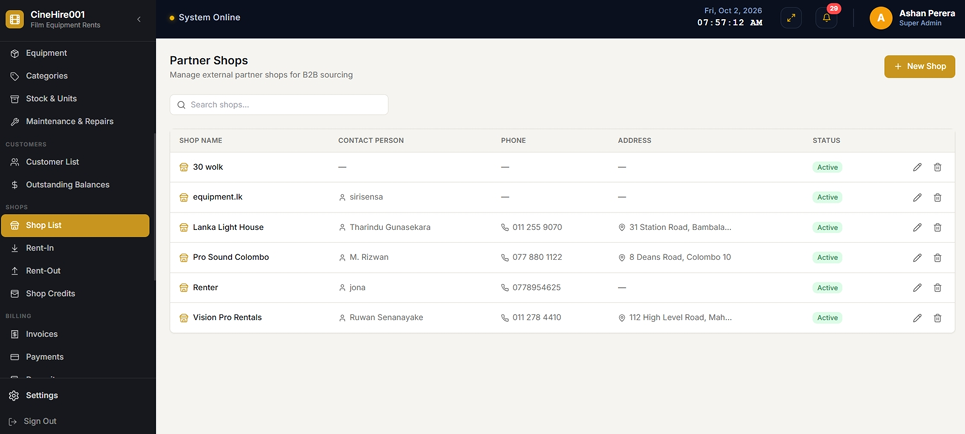
Partner Shop Directory
TRYCAM Camera Rentals supports businesses that both rent equipment from other rental shops and rent equipment out to those shops. Partner shops have dedicated contact records, pricing behavior, transaction history and a settlement ledger for full B2B visibility.
- ⚡ Partner shop contact records: name, contact person, phone, address and active status.
- ⚡ Separate partner-shop pricing applied for hire transactions with partner shops.
- ⚡ Full transaction and settlement history accessible per partner shop record.
- ⚡ Partner-shop hires use normal hire workflow without requiring security deposits.
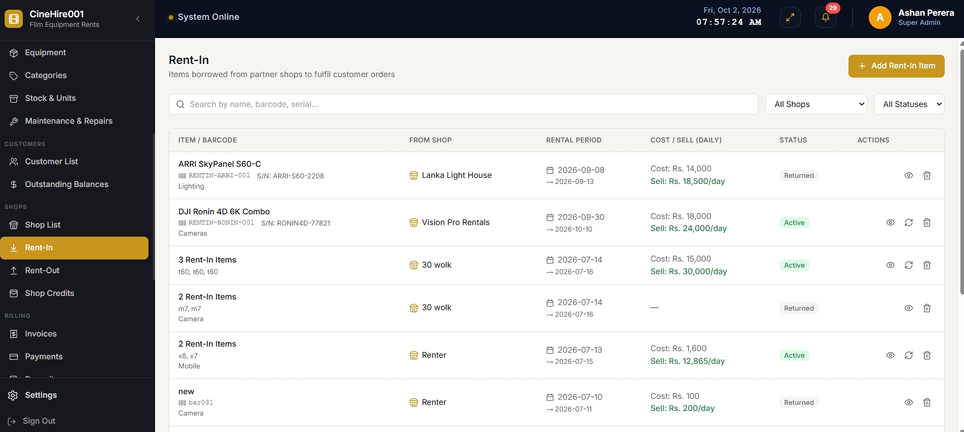
Rent-In from Partner Shops
When equipment is obtained from another shop to fulfil a customer order, the system records the source shop, source cost, selling rates, rental dates and barcode. A corresponding equipment representation enters normal stock so it can be hired onward. Rent-in cost is synchronized into the expense ledger automatically.
- ⚡ Source shop, cost, selling rate, dates and unit barcode recorded per rent-in.
- ⚡ Temporary product/unit enters available stock for normal customer hire onward.
- ⚡ Rent-in cost automatically synchronized into the business expense ledger.
- ⚡ Return status tracked until equipment is returned to the source partner shop.
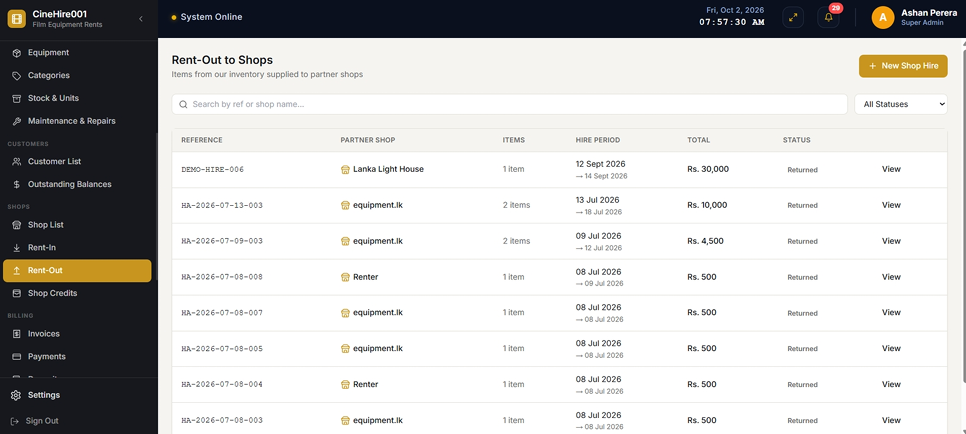
Rent-Out to Partner Shops
Equipment rented to another partner shop uses the normal hire workflow but applies partner-shop pricing rates. Rent-out transactions create receivables tracked in the Shop Credits ledger for clear settlement visibility between businesses.
- ⚡ Normal hire workflow applied for rent-out with partner-shop pricing rates.
- ⚡ Rent-out receivables posted to the Shop Credits ledger for B2B settlement tracking.
- ⚡ No security deposit required for partner-shop hire transactions.
- ⚡ Full rent-out transaction history accessible per partner shop record.
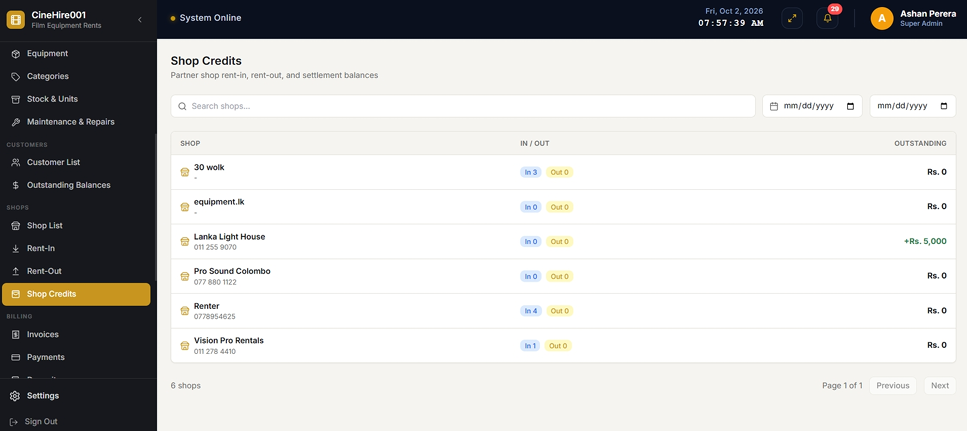
Shop Credits — B2B Settlement Ledger
Shop Credits summarizes receivables, payables, net outstanding balance and settlements per partner shop. Staff can record money paid to or received from a partner shop, and inspect the rent-in and rent-out transactions supporting the current balance.
- ⚡ Bi-directional balance: rent-out receivables and rent-in payables calculated per partner shop.
- ⚡ Net outstanding balance instantly calculated for clear settlement amount visibility.
- ⚡ Record money received or paid to partner shops with full settlement history.
- ⚡ Drill into rent-in/rent-out transactions supporting the current balance per shop.
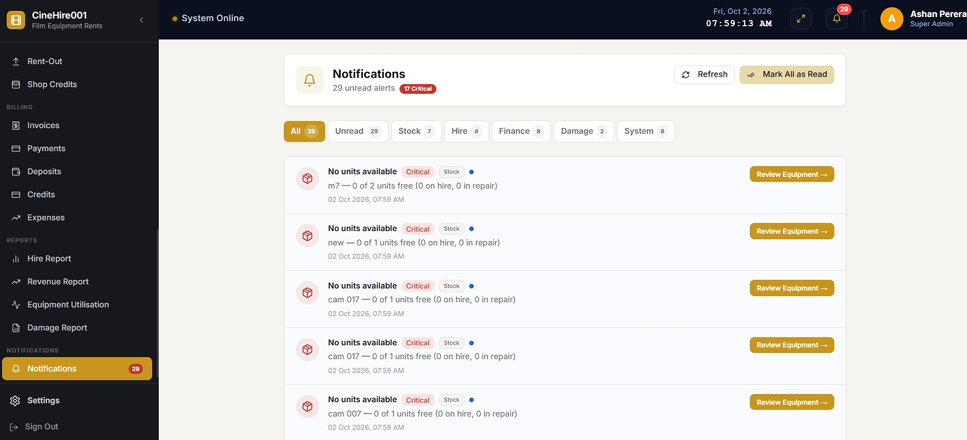
Notifications & Operational Alerts
The system generates live browser alerts from operational data for overdue hires, upcoming returns, low or zero stock, outstanding invoice payments, credit instalments due or overdue, damaged items awaiting repair, and local login and logout activity.
- ⚡ Overdue hire alerts with linked agreement for immediate staff action.
- ⚡ Upcoming due-back and low-stock notifications to prevent operational surprises.
- ⚡ Overdue credit instalment and outstanding invoice payment alerts for collection follow-up.
- ⚡ Category filtering and mark-as-read controls for alert management.
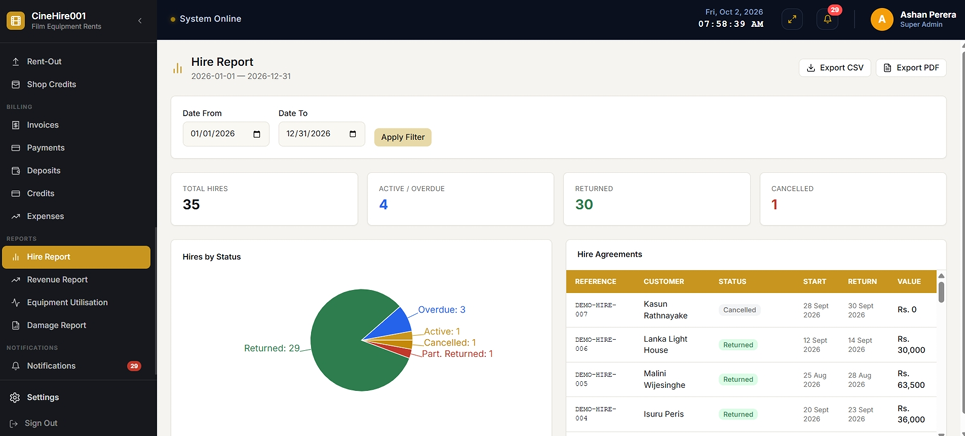
Hire Report
The Hire Report provides hire volume, status, customer, dates and value filtered by any date range. KPI cards, status distribution charts and detailed agreement listings give management a complete view of rental activity and booking patterns.
- ⚡ Date-filtered hire volume, status breakdown and total hire value in a single report.
- ⚡ KPI cards for active, completed, overdue and cancelled hire counts.
- ⚡ Detailed agreement listing with customer, dates, equipment and value per hire.
- ⚡ Exportable as date-filtered landscape PDF for management distribution.
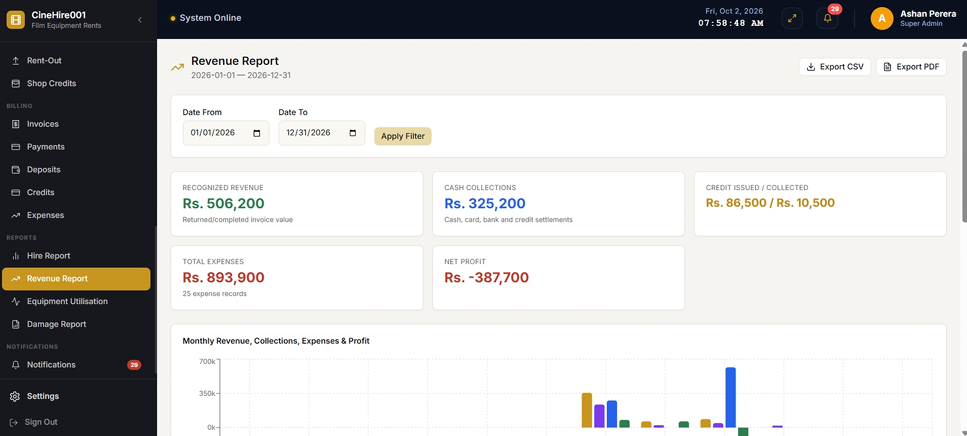
Revenue Report
The Revenue Report separates recognized revenue, cash collections, credit issued, credit collected, expenses and monthly net profit into a clear financial performance view. Revenue and cash are shown as distinct figures so the business understands the difference between earned income and actual cash received.
- ⚡ Recognized revenue vs. cash collections shown separately for accurate financial understanding.
- ⚡ Credit issued and credit collected tracked distinctly from invoice receivables.
- ⚡ Monthly expense totals and net profit calculation per reporting period.
- ⚡ Exportable as date-filtered landscape PDF for accountant and management review.
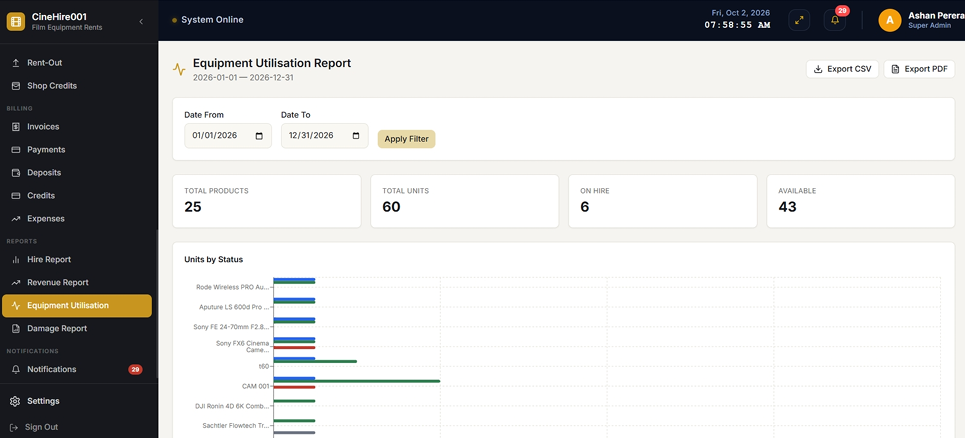
Equipment Utilisation Report
The Equipment Utilisation Report shows product and unit counts, on-hire stock, available stock, repair stock and utilization percentage per equipment category. It gives management the information needed to identify underperforming assets and plan fleet investment decisions.
- ⚡ Total units, on-hire, available and under-repair counts per product and category.
- ⚡ Utilization percentage calculated per equipment type for performance benchmarking.
- ⚡ Current stock snapshot view showing real-time availability and status distribution.
- ⚡ Exportable as landscape PDF for fleet planning and investment decision support.
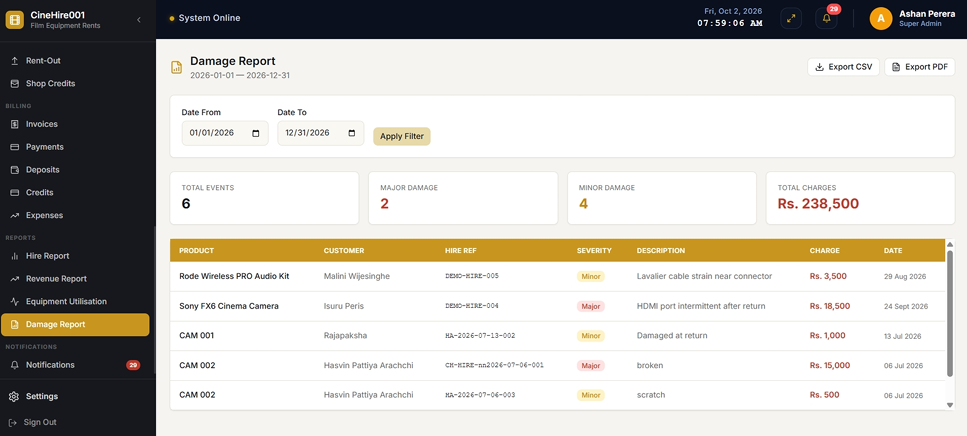
Damage Report
The Damage Report summarizes damage events by severity, charge amount, customer, equipment and date within any selected period. It allows management to identify high-risk customers, frequently damaged equipment, and total damage revenue recovered through customer billing.
- ⚡ Damage event listing by severity, description, charge and linked hire agreement.
- ⚡ Customer and equipment damage frequency analysis for risk identification.
- ⚡ Total damage charges recovered per period for financial performance review.
- ⚡ Exportable as date-filtered landscape PDF for insurance and management records.
.png)
Role-Based Access & Authentication
TRYCAM Camera Rentals uses role-based access so staff receive only the functions needed for their job. Administrators can create custom roles and assign view, create, edit or delete permissions for each operational module, protecting sensitive financial and inventory data.
- ⚡ Super Administrator, Manager, Counter Staff and custom role levels supported.
- ⚡ Module-level permissions: view, create, edit and delete assignable per role.
- ⚡ Email and password login with inactive user lockout for access control.
- ⚡ Role/permission checks guard operational modules in the frontend interface.
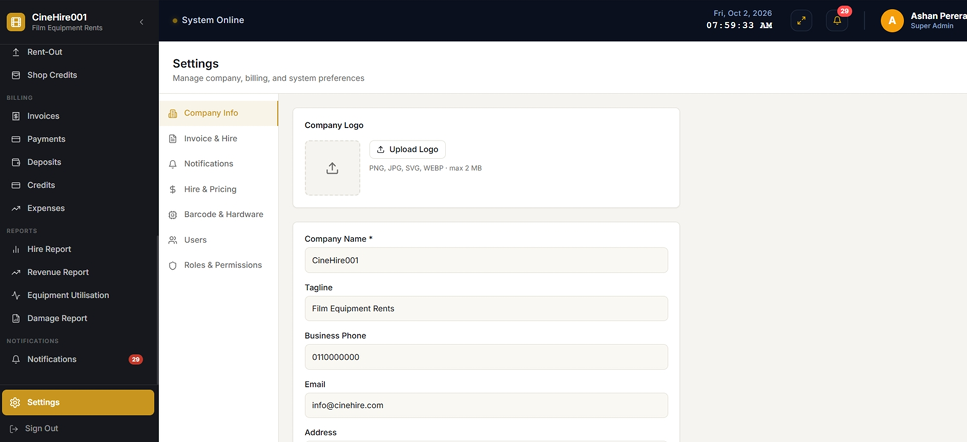
Settings & System Administration
The Settings module centralizes company information, document preferences, notification rules, pricing defaults, currency, hardware preferences, user management, role management and permission configuration — giving administrators full control over system behavior from a single interface.
- ⚡ Company info, logo, document preferences and currency settings in one place.
- ⚡ Notification rule configuration for overdue, low stock and payment alerts.
- ⚡ User account management: create, activate, deactivate and assign roles.
- ⚡ Hardware preferences for barcode scanner and printer configuration.
Key Business Benefits
TRYCAM Camera Rentals transforms disconnected manual processes into one connected, auditable rental operation.
Higher Stock Accuracy
Exact-unit tracking, status control and set-component handling reduce uncertainty about what is actually available for hire at any moment.
Fewer Booking Conflicts
Reservation and live-hire overlap checks protect the same physical unit from conflicting allocations and prevent double-booking errors.
Faster Counter Service
Barcode scanning reduces manual searching and data entry at issue and return, speeding up counter operations during busy shoot seasons.
Better Damage Accountability
Issue and return condition histories distinguish pre-existing faults from new return-stage damage, reducing customer disputes.
Stronger Financial Control
Deposits, revenue, cash, invoice debt, credit debt, expenses and shop balances are handled as separate concepts for accurate reporting.
More Informed Management
Dashboards, charts and reports turn operational activity into measurable utilization, revenue, expense and damage information.
Transform Your Rental Counter & Equipment Operations Today
TRYCAM Camera Rentals connects physical stock movement, customer and partner transactions, financial settlement, damage and maintenance, and management visibility in a single web-based platform.
Frequently Asked Questions
What is the Camera Rent POS System?
The Camera Rent POS System is software from Applantics (Pvt) Ltd (possystem.lk) for camera and film-equipment rental businesses in Sri Lanka. It covers serial and barcode tracking, reservations, damage inspection, B2B partner rent-in and rent-out, maintenance workflows, security deposits and multi-tier pricing.
Who is the Camera Rent POS System designed for?
It is designed for camera and film-equipment rental businesses that want one system to manage sales, stock and day-to-day operations instead of spreadsheets and manual records.
How much does the Camera Rent POS System cost in Sri Lanka?
Pricing depends on the number of branches, users and modules you need, so we quote per business. Message us on WhatsApp (+94 77 271 8001) or email admin@possystem.lk for a free quotation.
Is local support and onboarding available for the Camera Rent POS System?
Yes. Applantics has a local support team in Sri Lanka that helps with setup, training and ongoing support, and the system supports multi-branch operations.