Complete Retail & Made-to-Measure Management for Curtain Shops
Salicta Drapers Curtain Shop POS brings counter sales, product administration, supplier purchasing, stock control, quotations, customer measurements, custom job processing, deliveries, loyalty and financial administration into one connected application.
Comprehensive Curtain Shop Management
Explore the specialized modules engineered to manage custom measurements, track job progress, monitor fabric inventory, and unify your entire interior furnishing business.
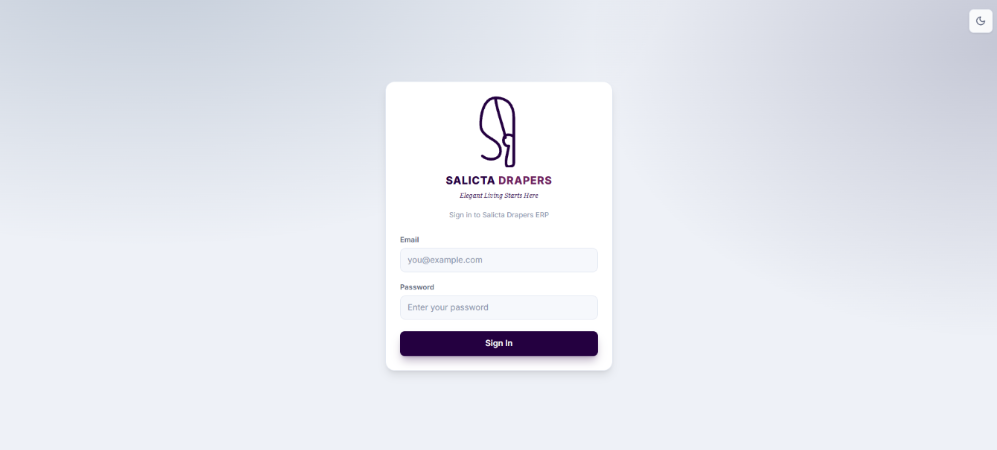
Login & Session Authentication
The security entry point that prevents unauthenticated access to operational and administrative information, establishing staff identity before opening protected routes.
- ⚡ Role Context: The authenticated account carries its assigned role and permitted pages into the session.
- ⚡ Session Continuity: Users navigate between permitted pages without repeated sign-ins during the active session.
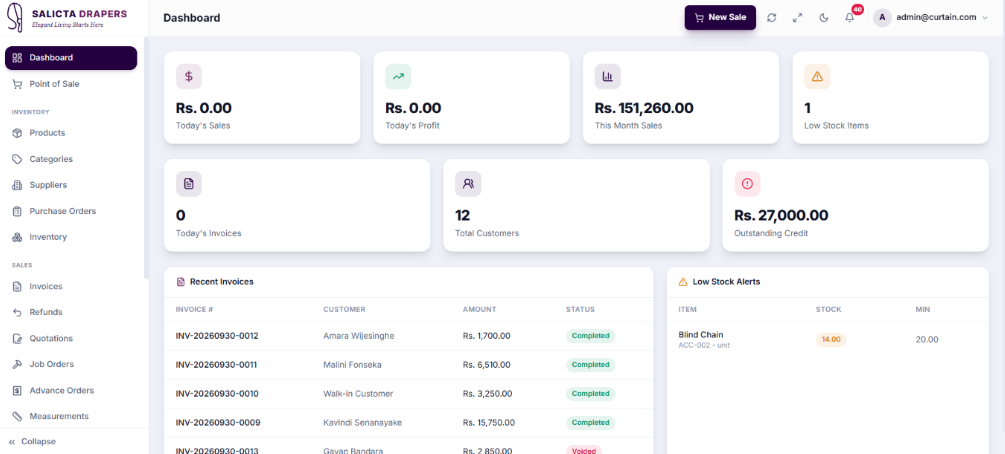
Dashboard Insights
The main operational control panel bringing the most important daily business indicators into one screen for quick review of sales, profits, and stock attention points.
- ⚡ Performance KPI Cards: Today Sales, Today Profit, and Month Sales summarize commercial performance.
- ⚡ Operational Snapshot: Combines sales signals and low-stock warnings to identify the next task needing attention.
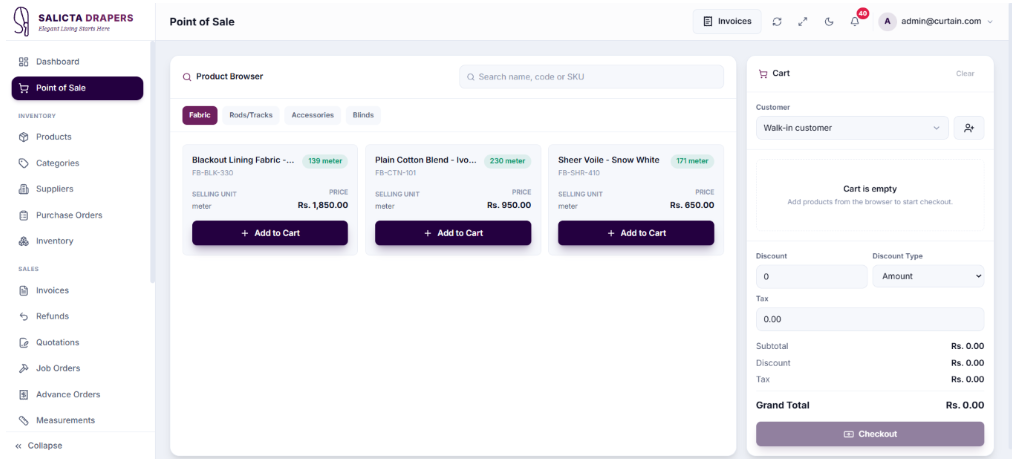
Point of Sale
The primary counter-sales workspace combining product search, cart preparation, customer selection, and payment processing.
- ⚡ Customer Integration: Link transactions to existing customers for history, credit, or loyalty tracking.
- ⚡ Stock & Checkout: Confirmed sales feed directly into the stock environment, generating a permanent invoice record.
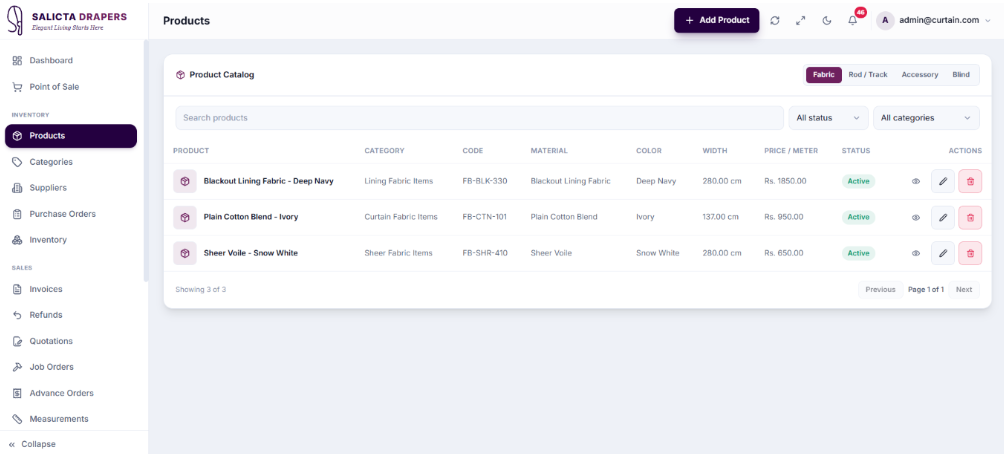
Products Management
The central catalog management area for items sold, quoted, stocked, or used in custom curtain work, structured for consistent use across modules.
- ⚡ Product Types: Separates catalog records into Fabric, Rod/Track, Accessory, and Blind types appropriately.
- ⚡ Shared Master Data: Product definitions are reused by inventory, purchasing, POS, and custom-order workflows.
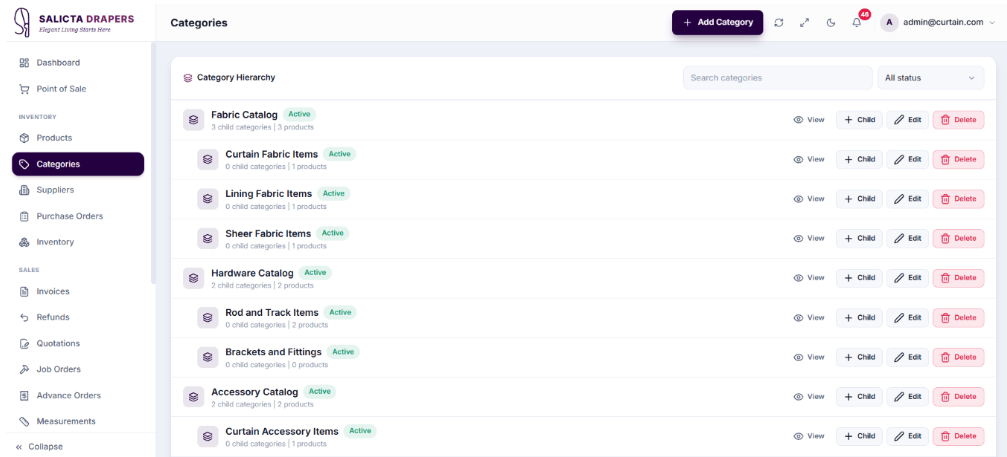
Categories Hierarchy
Organizes the catalog into a consistent hierarchy, providing a reusable structure that simplifies product entry, stock review, and reporting.
- ⚡ Parent & Child Levels: Support for root categories and specific subcategories like Curtain Fabrics or Blackout Fabrics.
- ⚡ Product Reuse: Selected by product records so the classification remains consistent throughout the entire system.
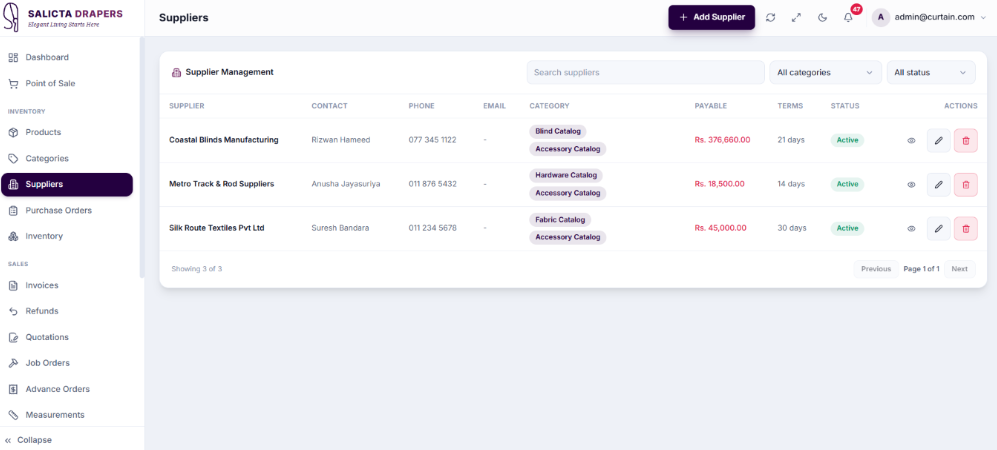
Suppliers Directory
The central vendor directory where companies providing fabrics, rods, tracks, blinds, and accessories are managed for the purchasing side.
- ⚡ Central Vendor Info: Store company, contact, email, and phone details to avoid duplicate profiles.
- ⚡ Purchase Integration: Supplier records are seamlessly selected and referenced when creating purchase orders.
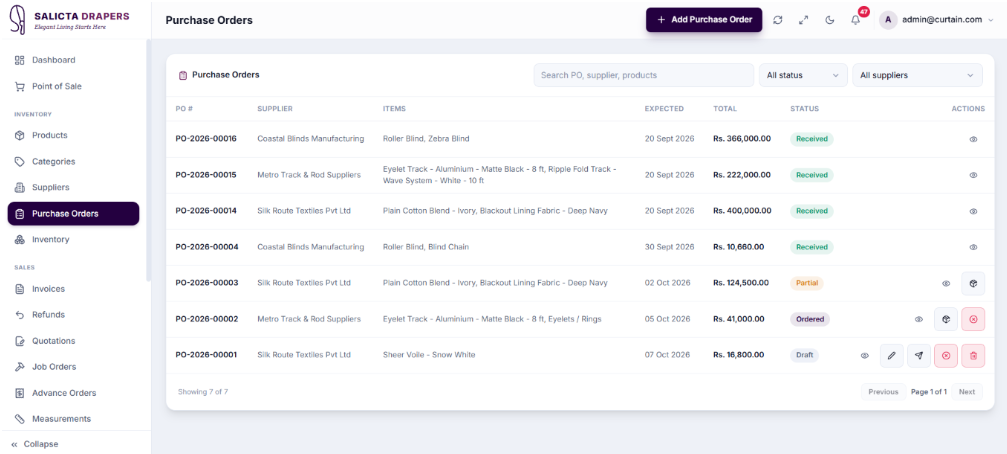
Purchase Orders
Manages planned purchases from suppliers before materials enter stock, providing a controlled purchasing trail from draft to receiving.
- ⚡ Status & Delivery Tracking: Monitor expected arrival dates and track status through draft, ordered, partial, and received.
- ⚡ Receiving Action: Record arrived quantities against the order so inventory is updated traceably.
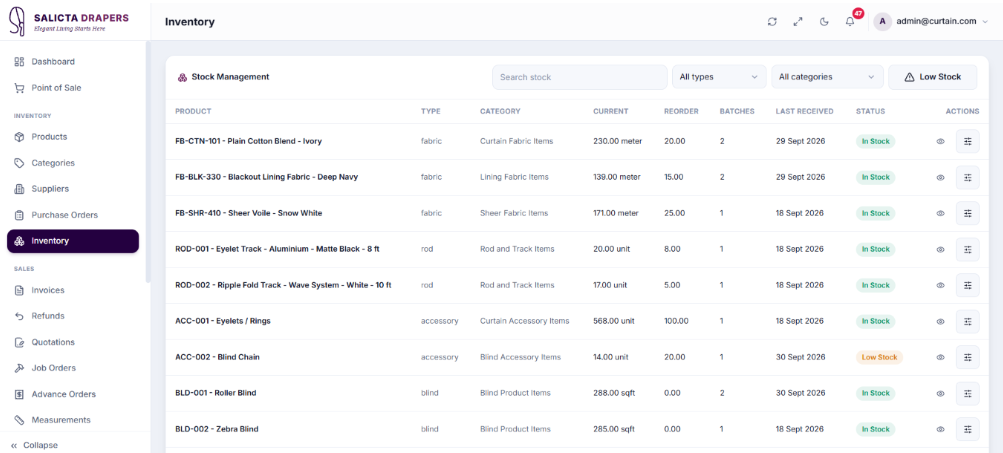
Inventory
Shows the current stock position of products used by retail sales and curtain jobs. Designed to give staff a reliable view of on-hand quantity and replenishment requirements.
- ⚡ Low-Stock Visibility: Items approaching or passing the reorder point are highlighted for faster action.
- ⚡ Movement Trace: Stock adjustments are recorded with a reason so changes can be reviewed easily.
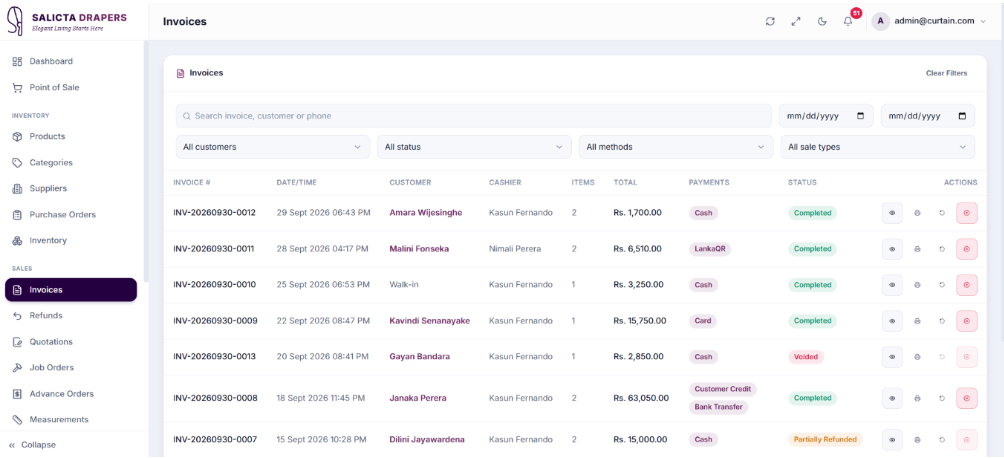
Invoices
The main history register for completed retail transactions. Find past sales, confirm payment information, and reopen transaction details.
- ⚡ Searchable History: Locate earlier transactions quickly without returning to the live POS cart.
- ⚡ Transaction Integrity: Historical invoices remain the permanent record generated from confirmed POS activity.
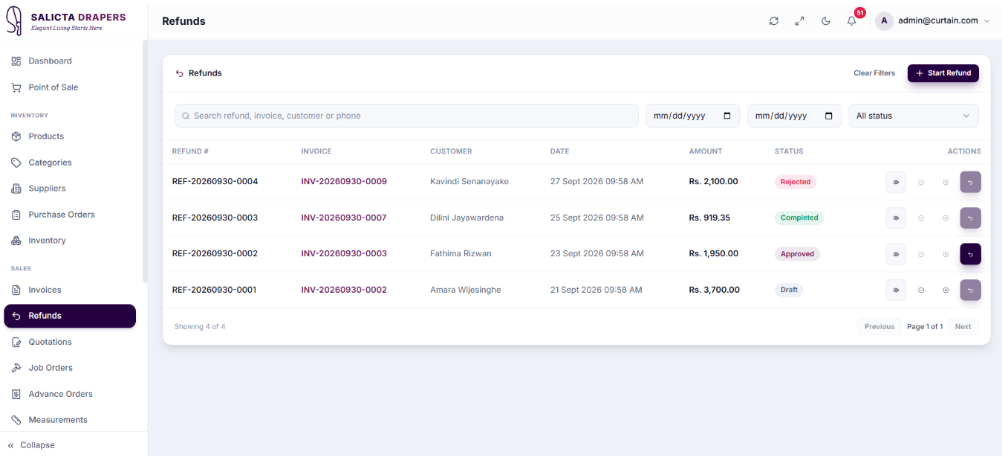
Refunds
Manages sales reversals as separate, traceable records linked to the original transaction, protecting invoice history.
- ⚡ Workflow Status: Pending, approved, and completed states provide visibility over the refund process.
- ⚡ Separate Audit Record: Refunds are handled separately instead of silently changing the original invoice.
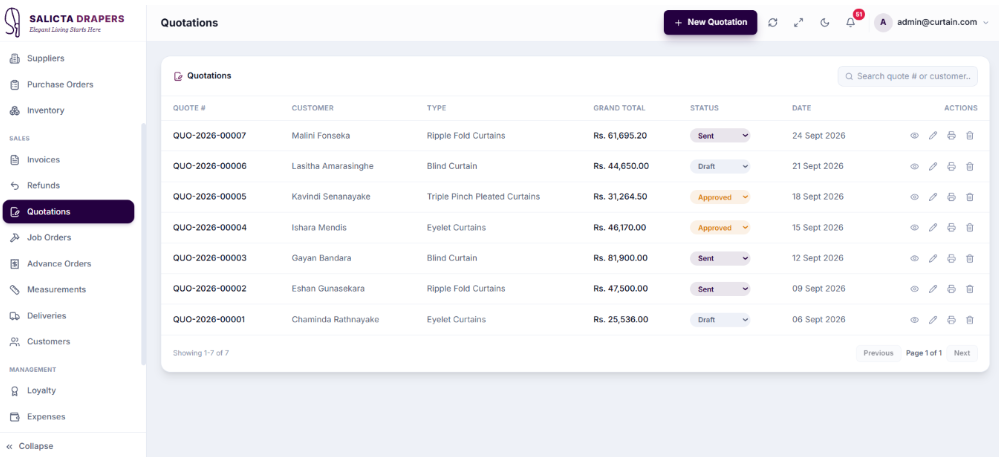
Quotations
Supports the pre-sale stage of made-to-measure curtain and blind work. Prepare and track a customer proposal before it becomes a confirmed job.
- ⚡ Curtain-Specific Inputs: Uses measurements and selected products relevant to custom orders.
- ⚡ Conversion Path: Accepted quotations progress into operational work directly, avoiding manual re-entry.
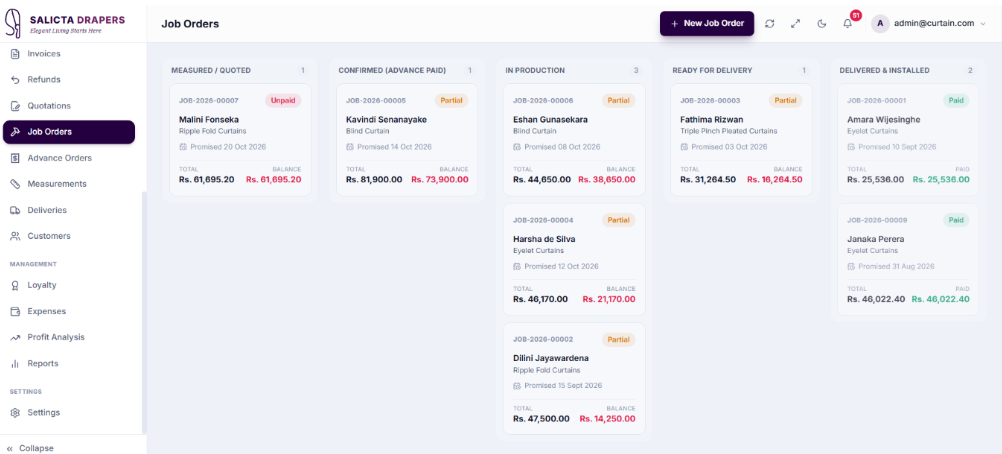
Job Orders
Tracks confirmed made-to-measure work, providing an operational view of what must be produced, deadlines, and current stage.
- ⚡ Balance Visibility: Shows the remaining amount due to identify unpaid or partially paid work.
- ⚡ Job Status & Readiness: Supports progress monitoring and connects job progress with material availability.
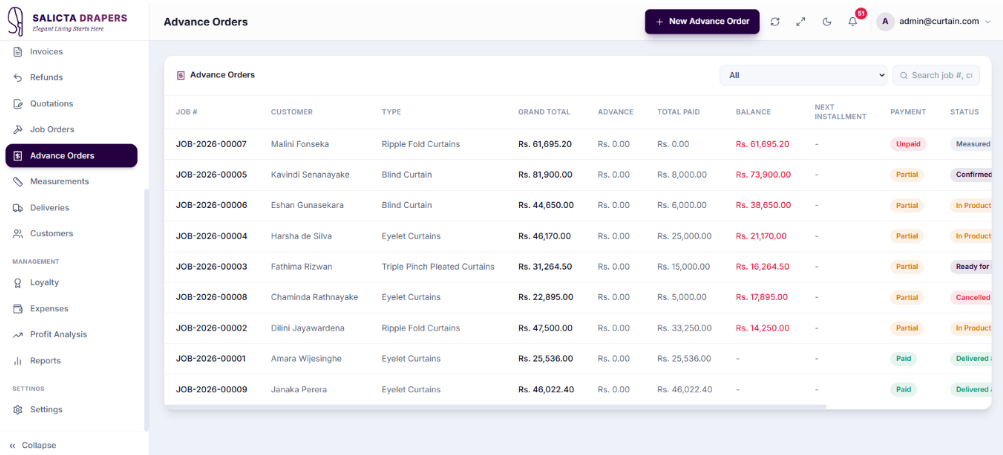
Advance Orders
A focused register for customer orders where an initial payment has been collected but a remaining balance is still outstanding.
- ⚡ Payment Progress: Supports ongoing balance collection instead of treating the initial advance as a completed sale.
- ⚡ Order Status: Staff can easily distinguish open, ready, and completed advance orders.
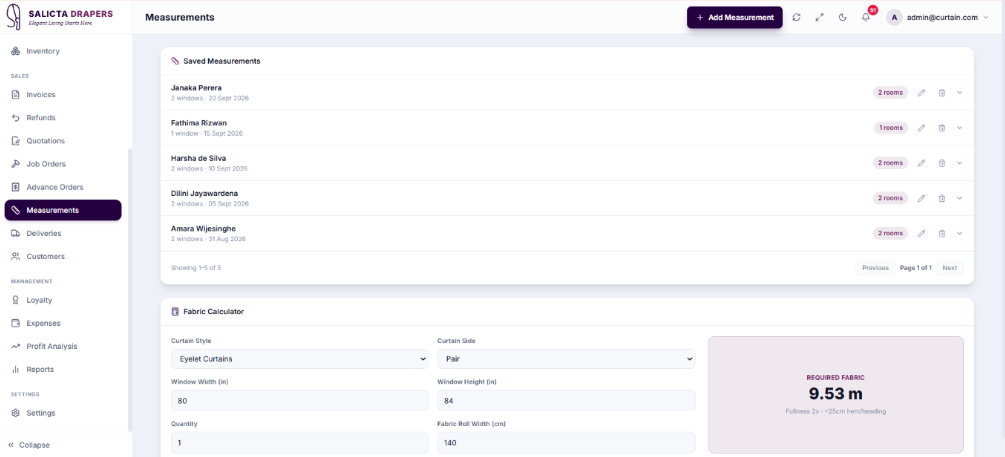
Measurements
Stores the physical dimensions required for made-to-measure curtain and blind work in a structured, reusable format.
- ⚡ Room & Window Structure: Multiple measurement rows represent different rooms or openings for one customer.
- ⚡ Reuse in Workflow: Stored dimensions support quotation and job preparation, reducing repetitive data entry.
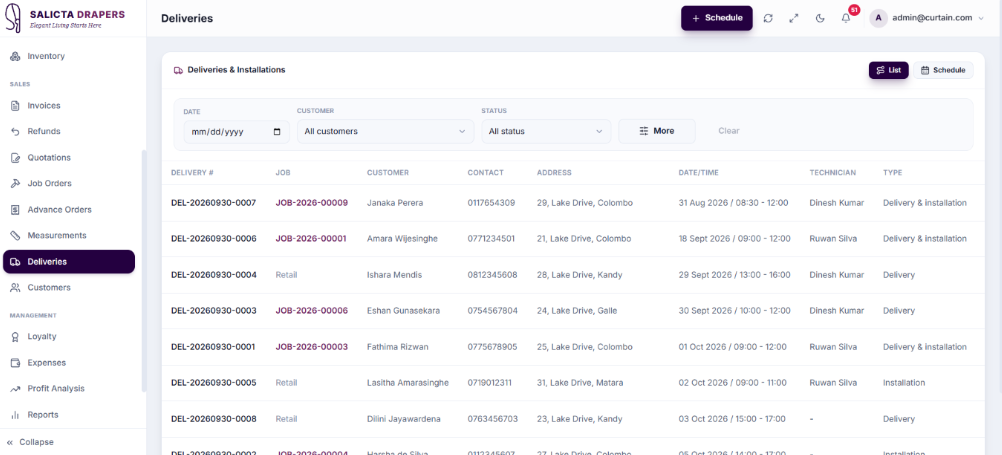
Deliveries
Controls the final fulfilment stage after a curtain or blind job is ready for the customer. Gives staff a dedicated schedule and status view so completed work is not left without a clear hand-off, assignment or completion record.
- ⚡ Job Connection: Delivery records remain linked to the relevant job or order being fulfilled.
- ⚡ Planned Date & Staff Assignment: Records when the delivery is expected and allocates responsibility to the right staff member.
- ⚡ Delivery Status: Supports stages such as Scheduled, Assigned, Out-for-Delivery, and Completed for clear lifecycle tracking.
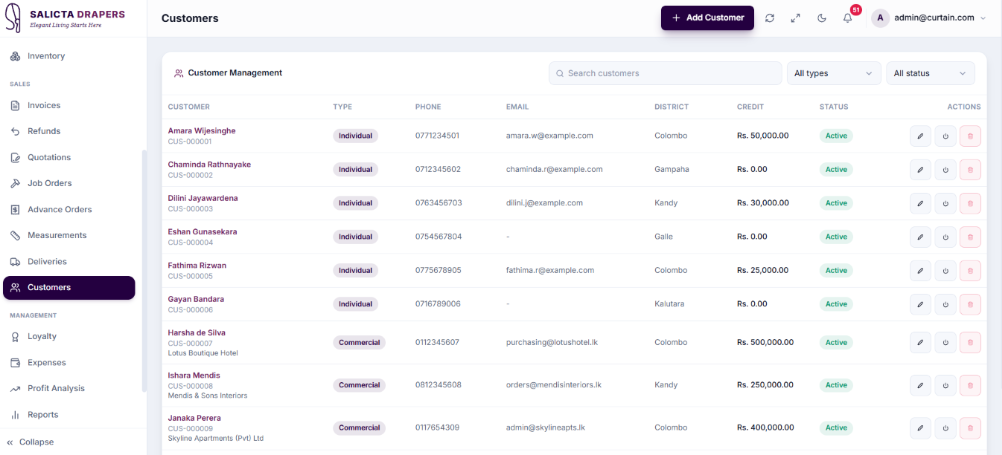
Customers
The central directory for people and businesses purchasing from Salicta Drapers. A single customer profile connects POS sales, quotations, custom jobs, measurements, delivery records, loyalty activity, and credit information.
- ⚡ Customer Type & Credit Control: Supports residential and commercial distinctions with credit limit and outstanding credit tracking for account-based transactions.
- ⚡ Cross-Module History: Customer records connect to quotations, jobs, invoices, loyalty, and related financial activity in one place.
- ⚡ Active Status & Central Search: Accounts can be deactivated while preserving history, and staff can locate existing customers before creating duplicates.
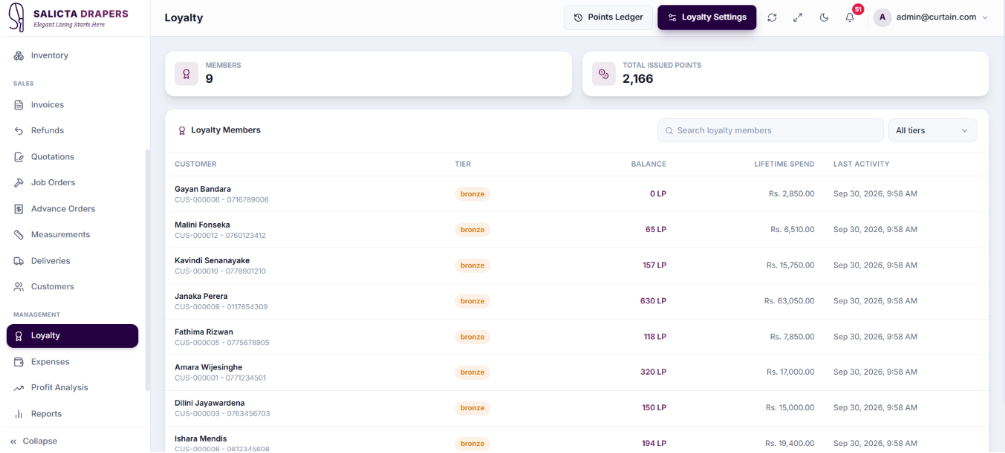
Loyalty Management
Manage customer reward points, membership tiers, spending history, and loyalty activity from one place. Displays total loyalty members, issued points, current balances, lifetime spending, and recent activity.
- ⚡ Loyalty Members View: Displays customer name, loyalty tier, point balance, lifetime spending, and last activity date.
- ⚡ Points Ledger: Keeps a full history of points earned, redeemed, or adjusted for each individual customer.
- ⚡ Loyalty Settings: Administrators configure loyalty rules, point calculations, redemption settings, and membership tier thresholds.
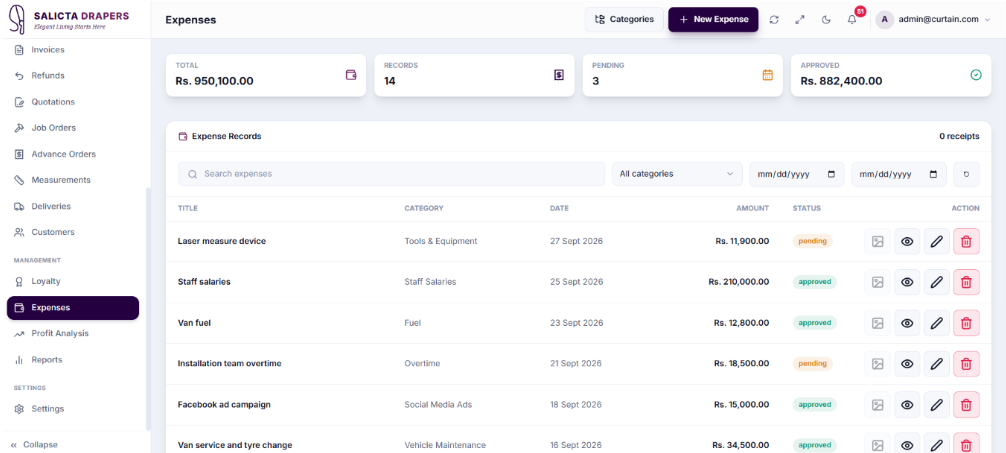
Expenses
Records the operating costs of the business so management can review outgoing expenditure alongside sales income. Net profitability cannot be understood accurately from revenue and product cost alone without capturing these costs.
- ⚡ Expense Entry & Categories: New costs are recorded with date, description, payee information, and classified into a consistent financial group for reporting.
- ⚡ Date & Category Filters: Allow management to focus on specific periods or types of expenditure for precise review.
- ⚡ Profit Integration: Recorded expenses feed directly into profit analysis so net results reflect all business overheads, not just direct product costs.
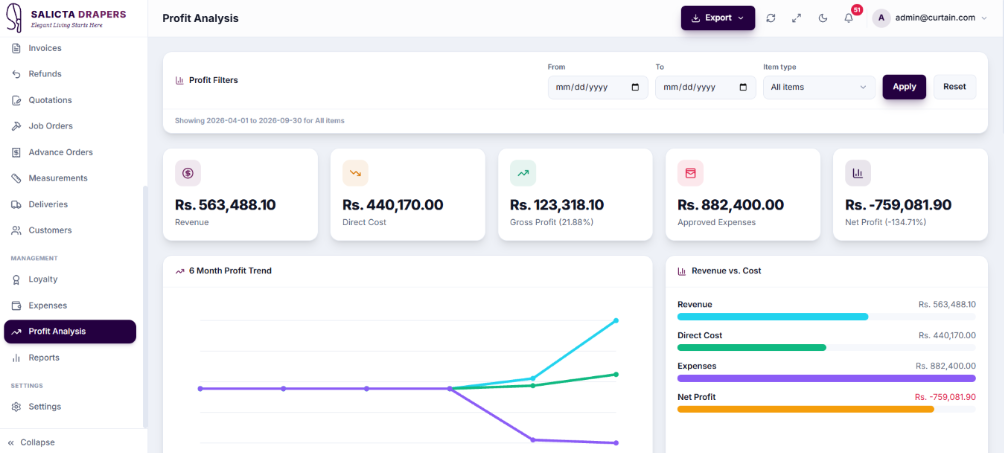
Profit Analysis
Converts transaction, cost, and expense information into a full management view of business performance. Separates direct cost, gross profit, operating expenses, and final net profit so management understands where results come from.
- ⚡ Full P&L Breakdown: Revenue, Direct Cost, Gross Profit, Expense Total, and Net Profit are all presented in one structured view.
- ⚡ Trend Visualization: Monthly or period-based charts help management observe movement and identify margin behavior easily.
- ⚡ Revenue vs. Cost Comparison: Side-by-side analysis makes it easier to identify margin changes than reading totals separately.
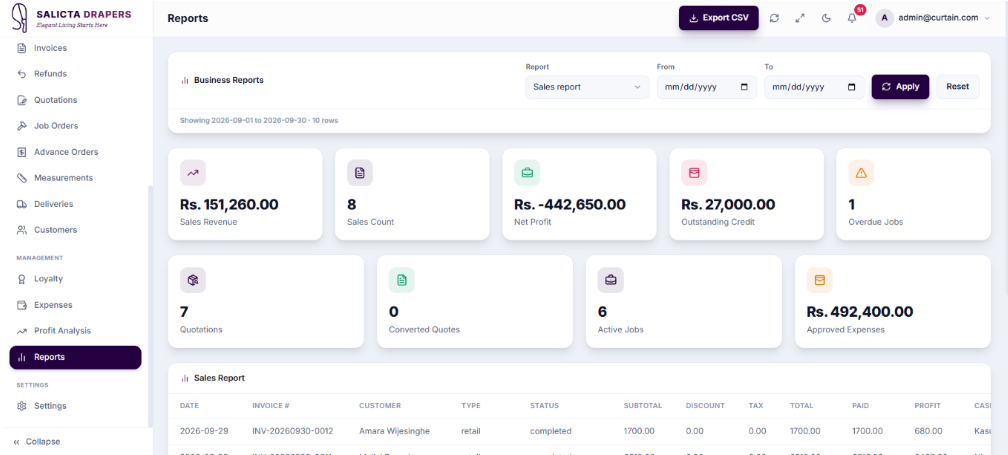
Reports
Provides a broader business-analysis view combining important operational and financial indicators. Management can select a reporting period and review sales, invoices, jobs, customer credit, inventory, and expenses from one environment.
- ⚡ Multi-Indicator Overview: Combines Sales Revenue, Invoice Volume, Active Jobs, Outstanding Credit, and Inventory indicators without opening each module separately.
- ⚡ Date & Period Filters: A consistent reporting window can be applied before reviewing performance to ensure comparable results.
- ⚡ Export Actions: Support sharing or further analysis of report information outside the application.
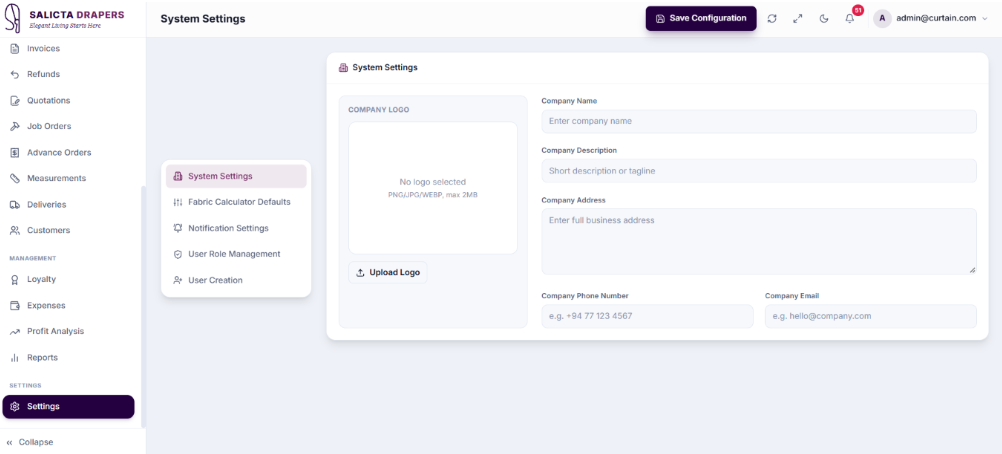
Settings
The administrative configuration hub of Salicta Drapers POS. Separates system-wide business rules from daily transactions and gives authorized users access to store information, fabric defaults, notification behavior, role permissions, and staff accounts.
- ⚡ Store & Fabric Configuration: Maintains business identity and centralizes curtain-specific calculation defaults used across custom job workflows.
- ⚡ Role & User Management: Defines which pages and capabilities each role can access, and creates staff accounts with the correct permissions.
- ⚡ Administrative Separation: Keeps configuration functions completely away from normal POS and operational processing for security.
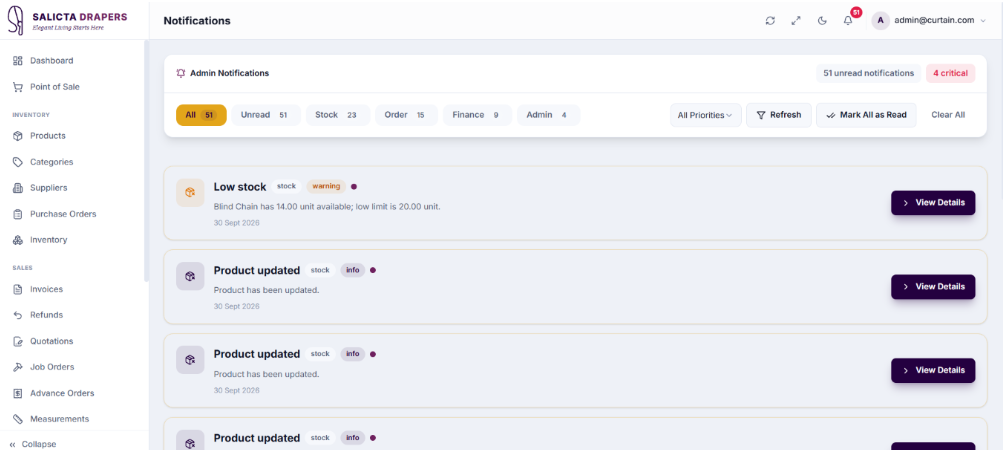
Notification Center
The consolidated operational alert inbox for the application. Brings stock, job, and payment-related events into one place so users can see what requires attention instead of repeatedly checking each source module.
- ⚡ Categorized Alerts: Groups notifications by operational area — Stock, Jobs, and Payments — with unread count and timestamps for prioritization.
- ⚡ Read Status & Mark All Read: Distinguishes new alerts from reviewed ones and allows users to efficiently clear the entire unread workload.
- ⚡ Operational Follow-Up: Each notification acts as an attention signal directing staff back to the relevant business process when action is required.
Complete Business Management Suite
Salicta Drapers POS includes every operational, customer, and administrative tool required for high-volume curtain and interior furnishing management.
Delivery Management
Controls the final fulfilment stage after a curtain or blind job is ready, ensuring completed work is not left without a clear hand-off record.
Customers & Loyalty
Central directory supporting POS sales, custom jobs, measurements, and a fully integrated loyalty tier and points system.
Profit & Expenses
Record operating costs and convert transaction data into a management view of gross margin and final net profit.
Administrative Settings
Centralize business rules, store identity, and manage fabric calculators, ensuring consistency across all custom jobs.
Notification Center
Consolidated operational alert inbox bringing stock, job, and payment-related events into one actionable place.
Management Reports
A broader business-analysis view combining sales, invoices, active jobs, credit, and inventory indicators from one environment.
Transform Your Curtain Shop Operations Today
Unify your counter sales, customer measurements, advance orders, fabric inventory, and financial management with Salicta Drapers POS.
Frequently Asked Questions
What is the Curtain Shop POS System?
The Curtain Shop POS System is software from Applantics (Pvt) Ltd (possystem.lk) for curtain, blind and interior furnishing businesses in Sri Lanka. It covers retail sales, made-to-measure order management, stock control and customer records.
Who is the Curtain Shop POS System designed for?
It is designed for curtain, blind and interior furnishing businesses that want one system to manage sales, stock and day-to-day operations instead of spreadsheets and manual records.
How much does the Curtain Shop POS System cost in Sri Lanka?
Pricing depends on the number of branches, users and modules you need, so we quote per business. Message us on WhatsApp (+94 77 271 8001) or email admin@possystem.lk for a free quotation.
Is local support and onboarding available for the Curtain Shop POS System?
Yes. Applantics has a local support team in Sri Lanka that helps with setup, training and ongoing support, and the system supports multi-branch operations.