Complete POS & Multi-Branch System for Ice Cream Parlors
Purpose-built retail and stock management system for ice cream shops, gelaterias, and dessert chains in Sri Lanka. Handles touch counter scoop billing, open bucket tracking, waffle/normal cone inventories, advance event reservations, and branch-to-branch stock transfers.
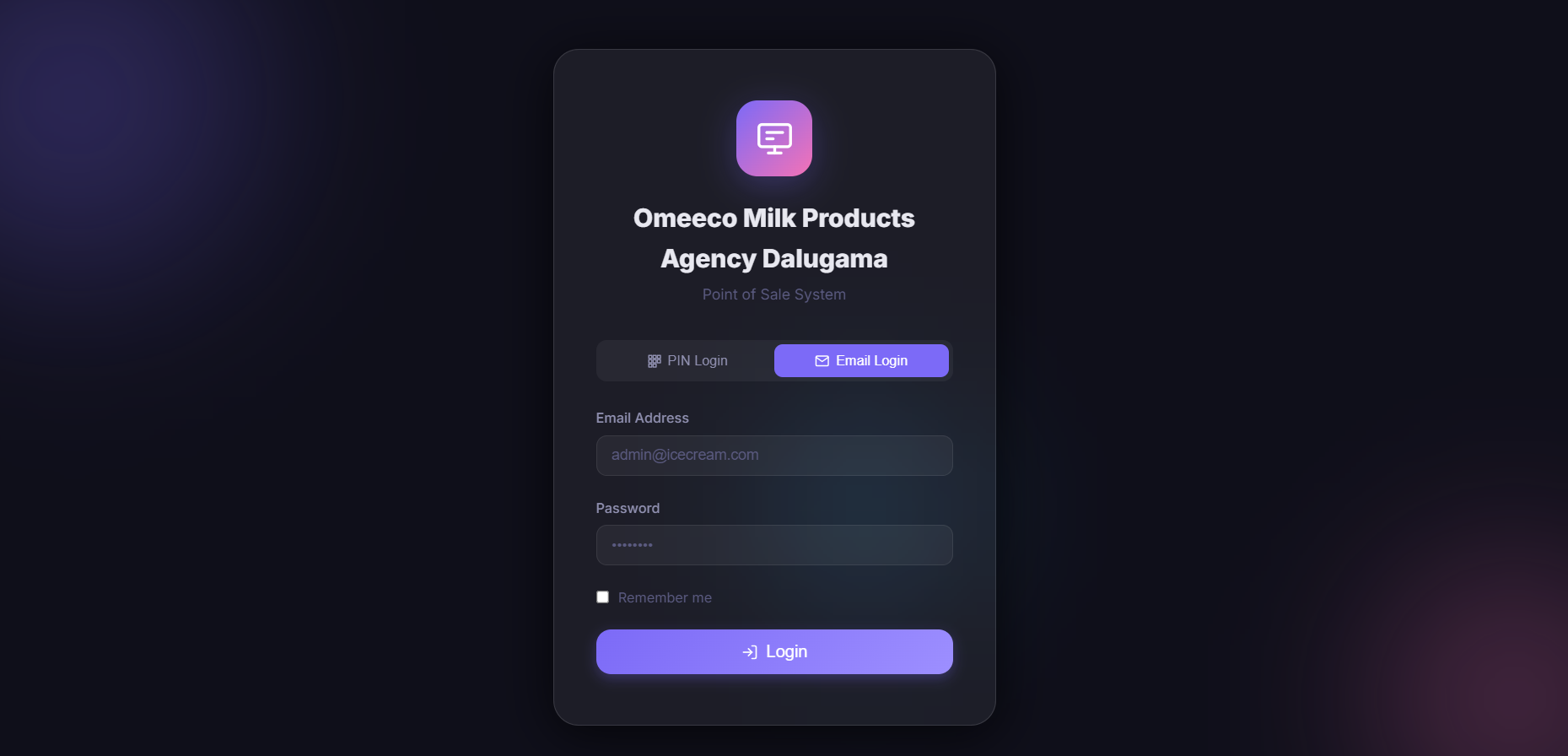
Dual Login & Touch PIN Authentication
Access to Ice Cream POS is protected by a branded login screen showing the shop name. Two sign-in methods are provided: a quick PIN keypad for counter staff on touch terminals, and a standard email and password login for administrators and managers. After signing in, each user is taken only to the pages their role allows.
- 🍦 Touch PIN Keypad: Large on-screen numpad for fast 4–6 digit PIN entry by counter cashiers, opening the POS terminal immediately
- 🍦 Email & Password Login: Secure administrative sign-in tab for managers and business owners with remember-me capability
- 🍦 Permission-Aware Redirect: Users land directly on their permitted frontline pages, preventing unauthorized access across branches
Central Operations Control Panel & Real-Time Metrics
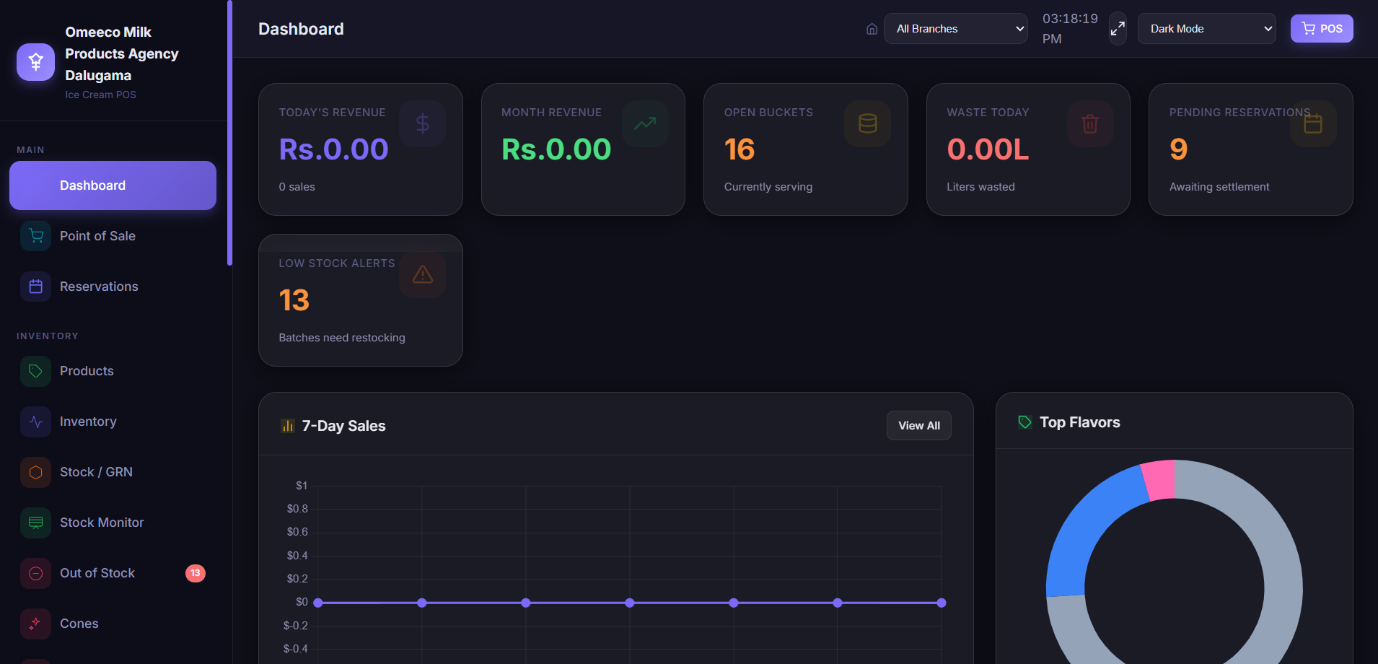
The Dashboard is the first screen managers see after logging in and acts as the central control panel of the system. It brings together live figures from sales, open buckets, waste, reservations and stock, scoped to the branch selected in the top bar (or to all branches).
- 🍦 Live Operational KPI Cards: Instant metrics for Today's Revenue, Month Revenue, Active Open Buckets (16), Daily Waste Liters, and Pending Reservations
- 🍦 7-Day Revenue Trend: Visual daily revenue curve comparing cash flow over the last 7 days with quick links to the Sales Log
- 🍦 Top Flavours & Stock Restock Alerts: Doughnut charts displaying best-selling ice cream varieties and critical batch re-order warnings
Fast Touchscreen POS & Live Scoop Terminal
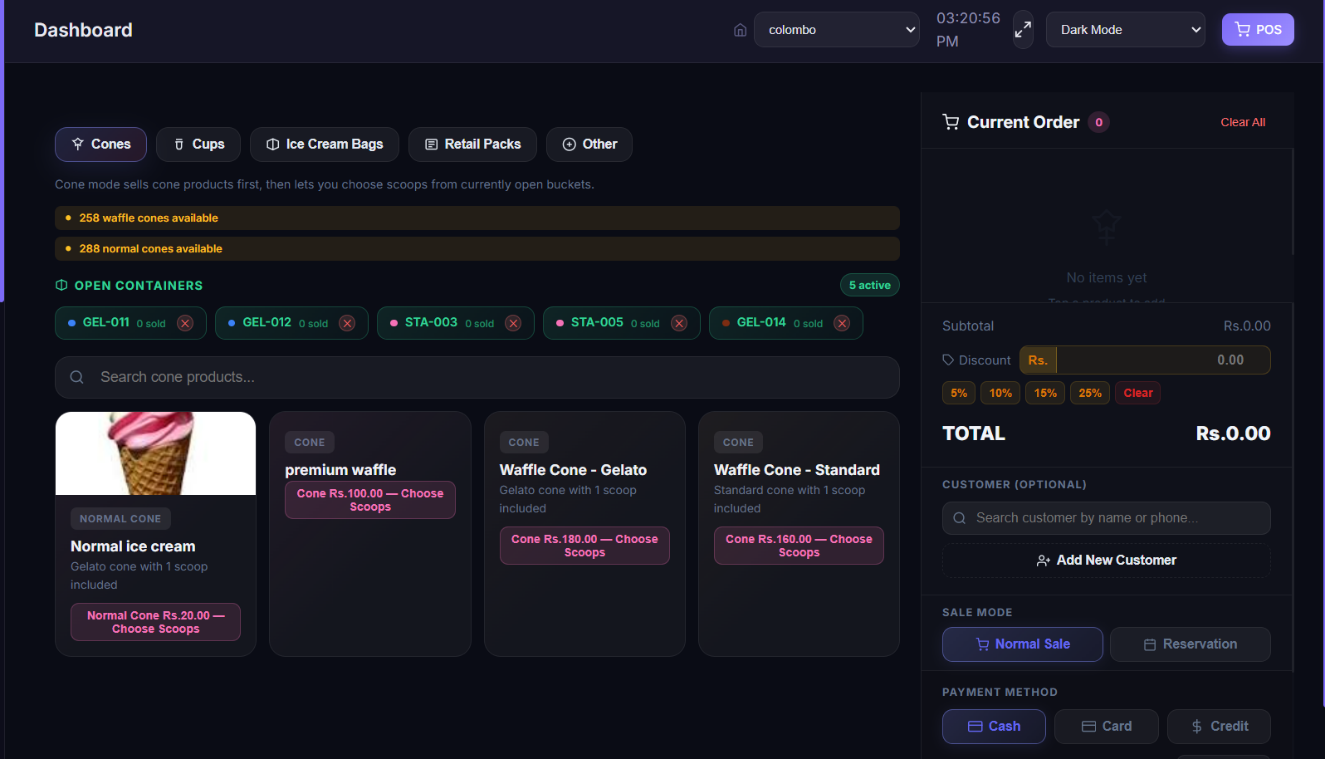
The POS page is the frontline sales terminal used at the counter. It is built for touch screens, with large tabbed product cards on the left and the Current Order, customer, sale mode and payment panel on the right. Completing a sale deducts stock from the active branch immediately and produces a printable receipt with a barcode. The same screen is also used to create reservations.
- 🍦 Category Tabs & Scoop Selector: One-tap navigation across Cones, Cups, Ice Cream Bags, Retail Packs, and Other merchandise
- 🍦 Active Open Container Chips: Visual status chips showing active scoop containers (GEL-011, GEL-012, STA-003) with sold count and quick-close buttons
- 🍦 Live Cone Inventory Badges: Real-time counter notices showing available Waffle Cones (258) and Normal Cones (288) before order entry
Advance Event Booking & Reservation Mode at Checkout
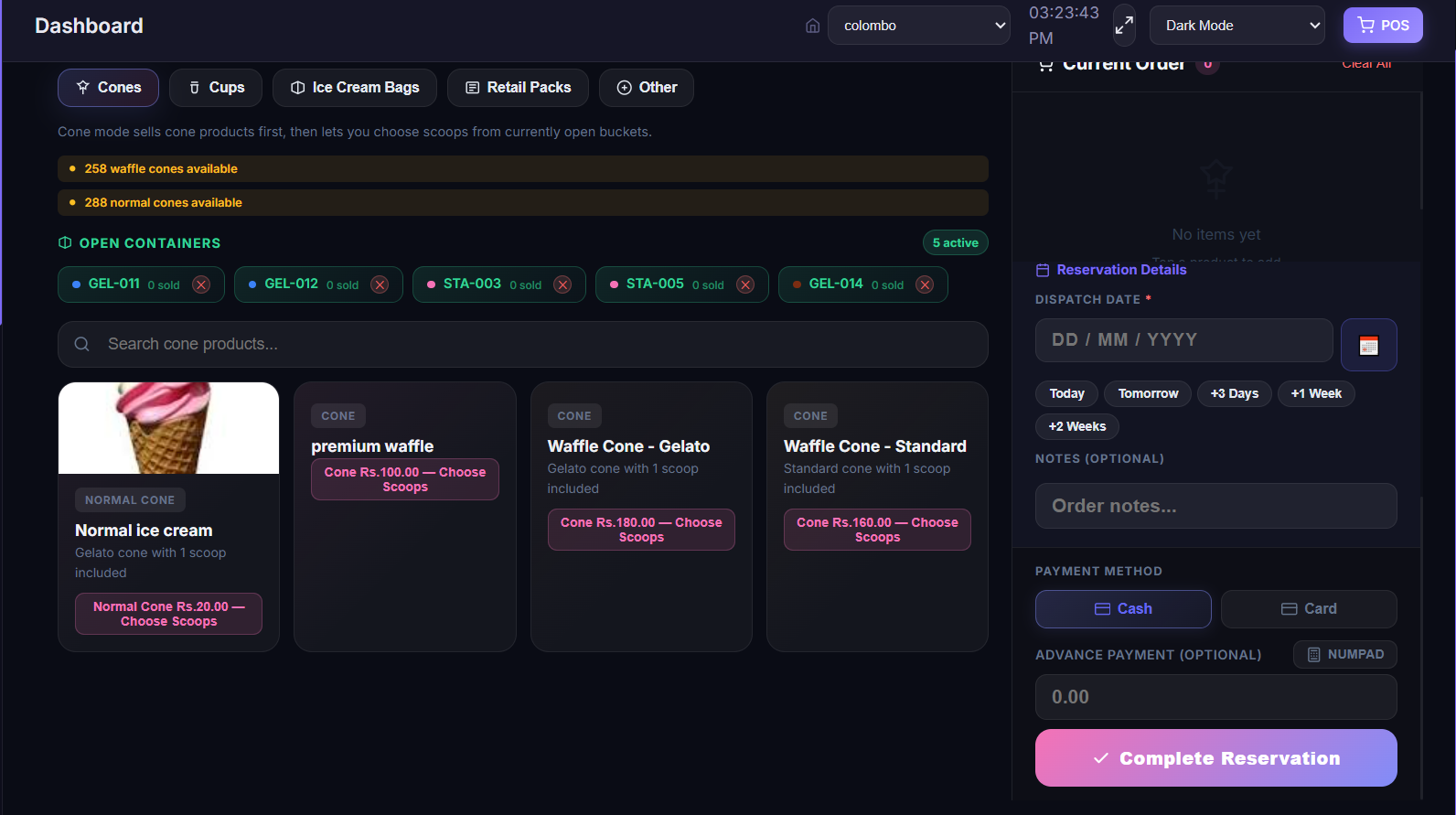
Reservations let a customer order in advance — for example for a party or event — pay an advance now and collect the goods on a later dispatch date. The system holds the needed stock for the order, tracks every payment and the remaining balance, and highlights overdue orders.
- 🍦 Instant Reservation Switch: Single toggle from 'Normal Sale' to 'Reservation' mode within the standard POS checkout screen
- 🍦 Dispatch Date Selector: Fast date picker with quick presets (+3 Days, +1 Week, +2 Weeks) and optional delivery instruction notes
- 🍦 Advance Deposit Handling: Record partial cash or card down payments with on-screen numpad and automatic balance calculation
Multi-Status Reservation Register & Order Tracking
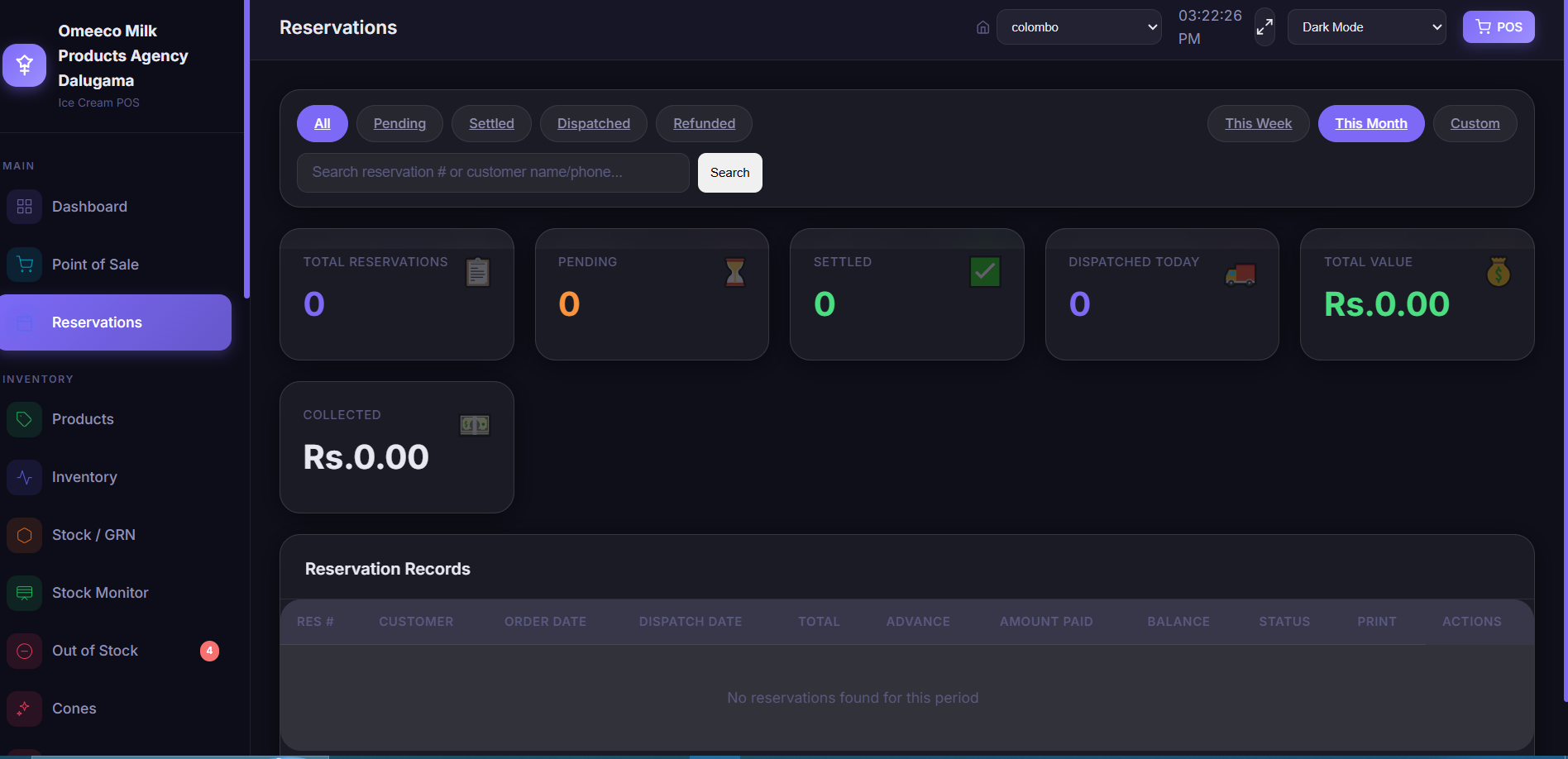
The Reservation Management page centralizes all advance customer bookings. Staff can filter reservations by status (Pending, Settled, Dispatched, Refunded), manage order dispatch dates, settle balances upon pickup, and print barcoded reservation vouchers.
- 🍦 Order Status Summary Cards: Live counters for Total Reservations, Pending Orders, Settled Orders, Dispatched Today, and Total Collected (Rs.)
- 🍦 Stock Hold Protection: Reserved ice cream containers and cone packs are locked to prevent accidental counter sale before the dispatch date
- 🍦 Multi-Stage Order Actions: Contextual action buttons for View, Print Voucher, Settle Balance, Edit Order, and Dispatch Goods
Sales Log Overview, Revenue Trends & Product Volumes
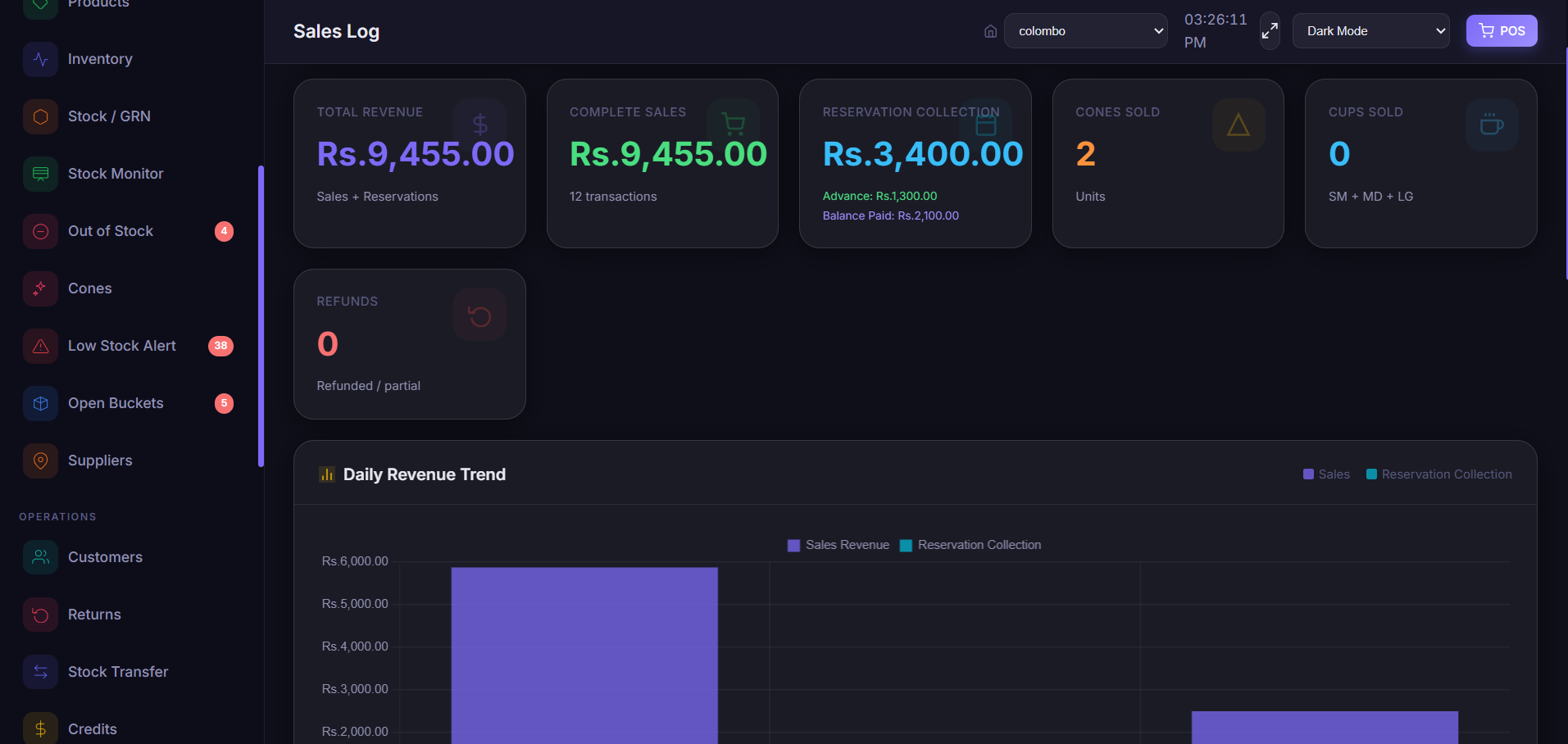
Once a sale is completed it becomes part of the branch's permanent transaction record. The Sales Log gives a searchable history of every sale and reservation collection, complete with revenue breakdowns, cashier filtering, and daily trend visualizations.
- 🍦 Comprehensive Revenue KPI Cards: Real-time visibility into Total Revenue (Rs. 9,455.00), Complete Sales, Reservation Collection (Rs. 3,400.00), and Refunds
- 🍦 Cone & Cup Volume Counters: Exact unit tracking distinguishing total Cones Sold vs. Cups Sold across small, medium, and large sizes
- 🍦 Daily Revenue Trend Bar Chart: Visual bar graphs separating daily walk-in counter sales revenue from advance reservation collection
Itemized Transaction Log & Receipt Audit Desk
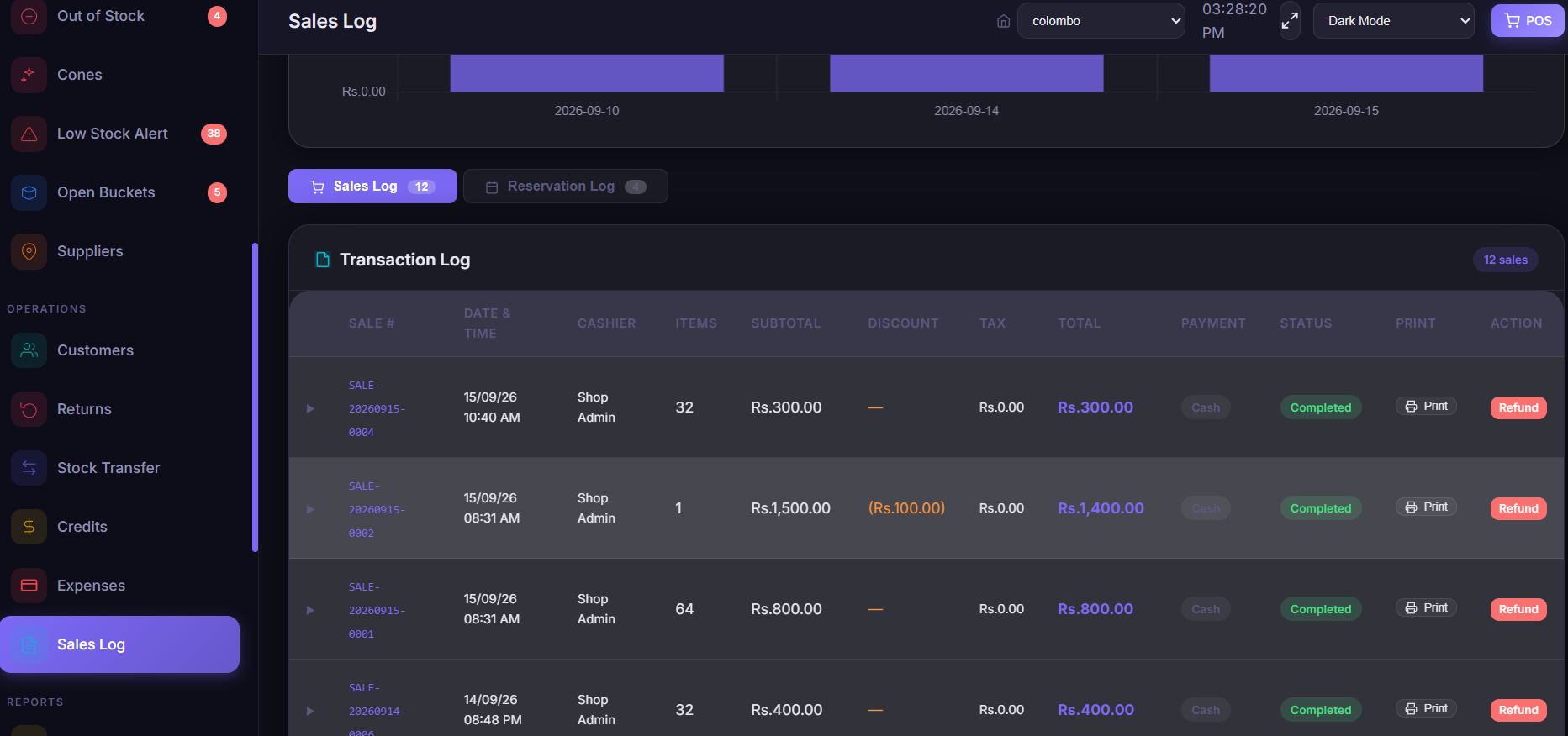
The Transaction Log provides an exhaustive, searchable audit trail of every register sale. Staff can view sale numbers, timestamps, cashier names, item counts, subtotals, applied discounts, tax, payment modes, and instant reprint or refund triggers.
- 🍦 Detailed Sale Ledger: Displays unique Sale IDs (e.g. SALE-20260915-0004), timestamps, cashier identity, subtotal, and payment method
- 🍦 Expandable Item Details: Expand any transaction row to inspect exact flavors, scoop counts, packaging variants, and unit prices sold
- 🍦 Reprint & One-Click Refund: Instant thermal receipt reprinting and quick-action 'Refund' button routing directly to the refund desk
Barcode Scan Refund Desk & Audit Records
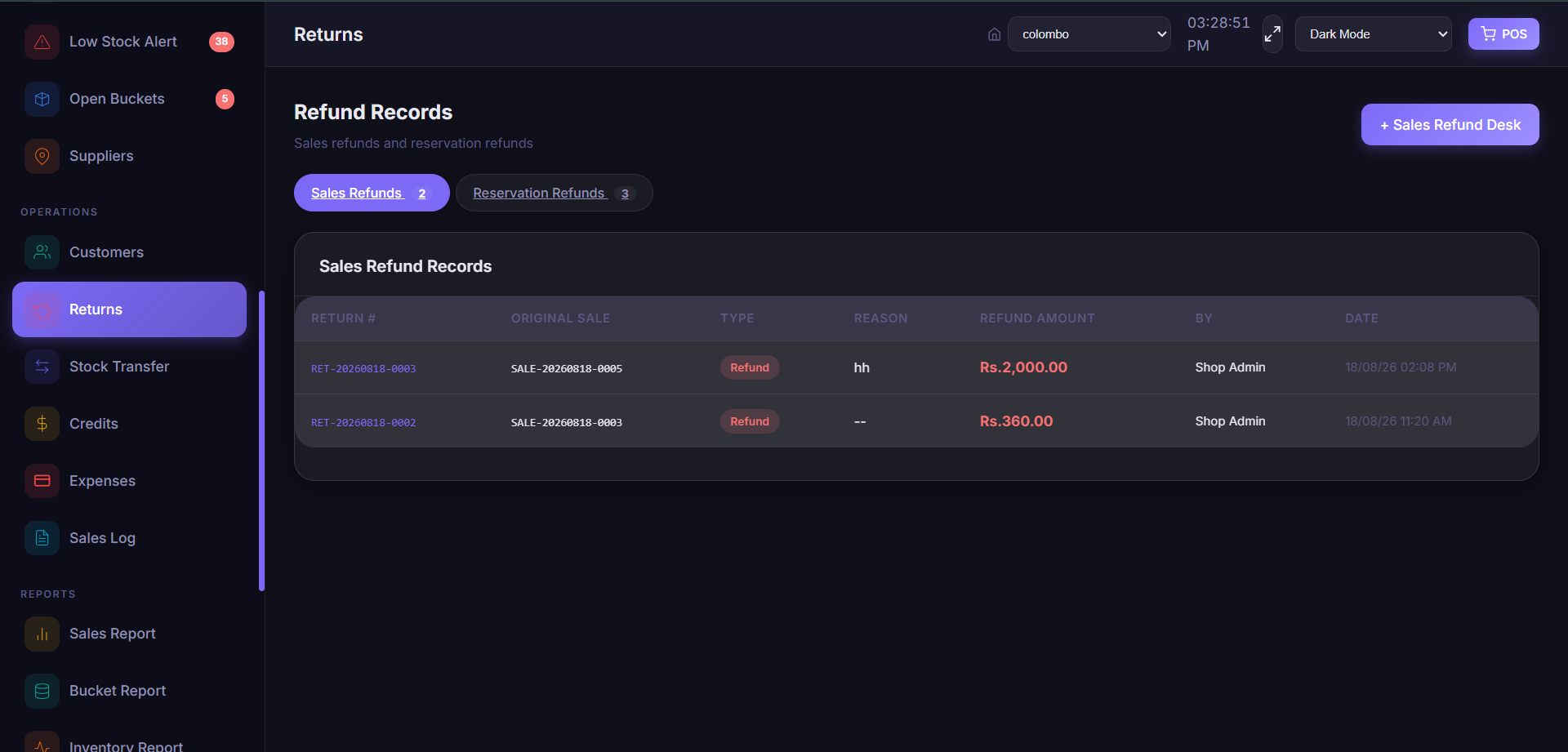
The Returns module handles customer refunds with strict inventory integrity. Staff can scan receipt barcodes or enter sale IDs to pull up the original transaction, process line-item returns, restore sealed stock automatically, and log mandatory return reasons.
- 🍦 Barcode Scanner Integration: Scan the thermal receipt barcode to retrieve full billing details and return history within seconds
- 🍦 Intelligent Stock Restoration: Returned sealed ice cream bags and intact cones are automatically re-credited to inventory batches
- 🍦 Dual Audit Tabs: Dedicated historical logs for Sales Refunds and Reservation Refunds with cashier tracking and recorded reason notes
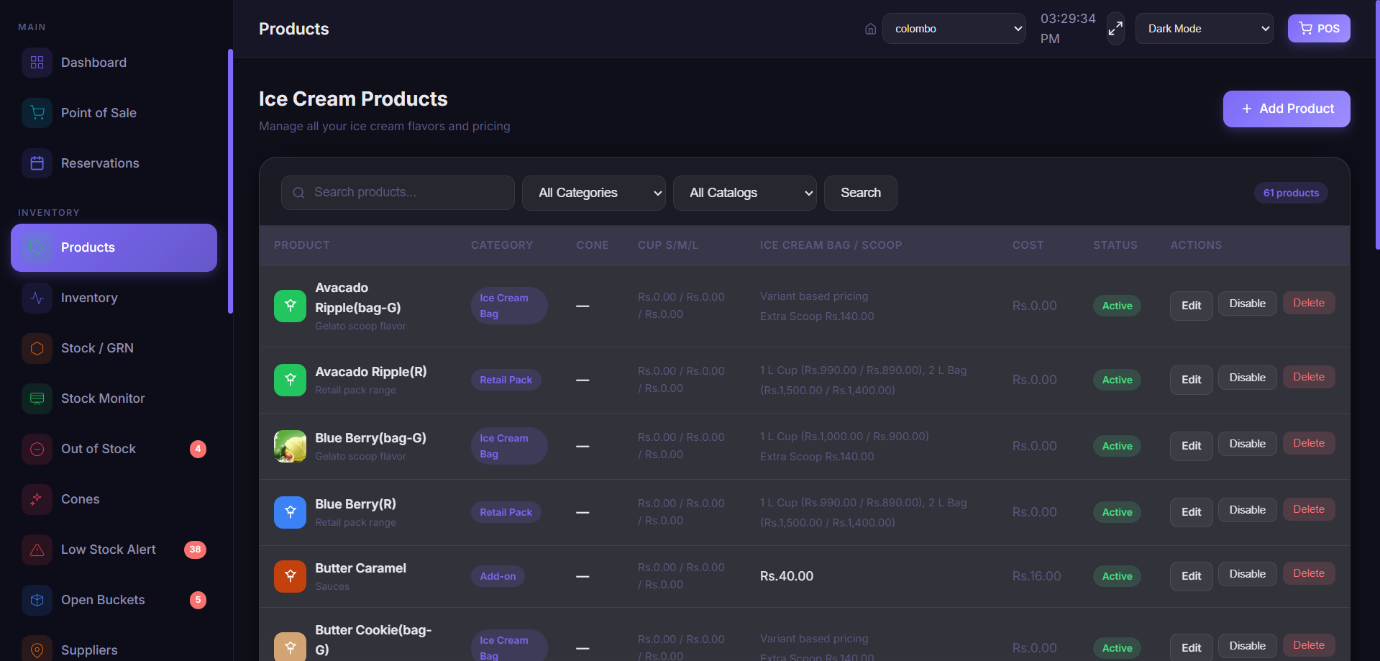
Flavor Catalog, Variant Pricing & Category Management
The product catalogue underpins every other part of the system — the same product name, category, prices, colour and image configured here appear on the POS, receipts, stock pages, transfers and reports.
- 🍦 Granular Product Categorization: Define Cones, Premium Cones, Normal Cones, Cups, Bulk Bags, Retail Packs, and Add-on Toppings
- 🍦 Multi-Tier Variant Pricing: Set standard retail prices, scoop rates, bulk bag prices, cup sizes (S/M/L), and default purchase costs for GRN
- 🍦 Lifecycle Controls: Enable, disable, or edit product visibility on the POS terminal with active status toggles and visual color tagging
Goods Received Note (GRN) Batches & Liters Inventory
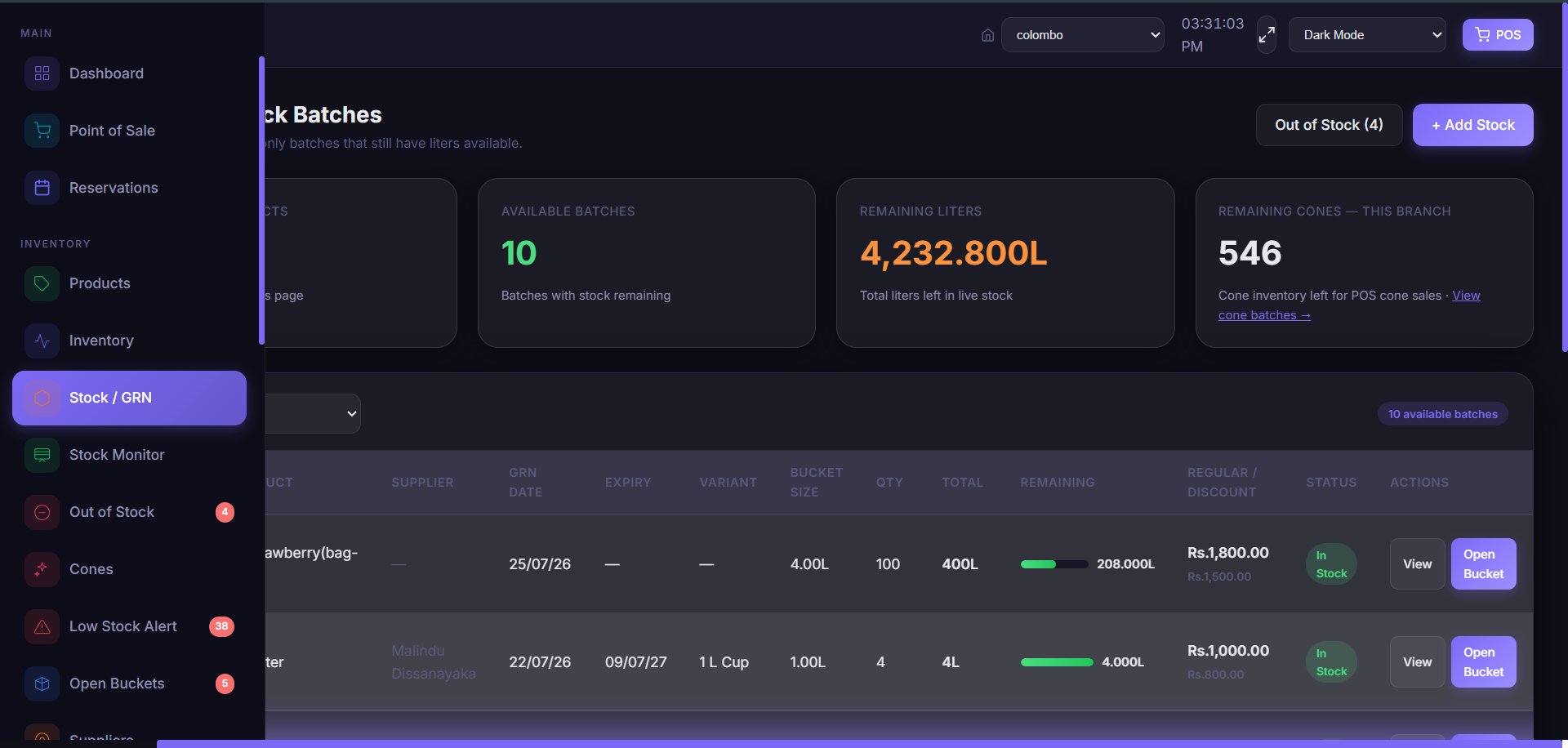
All ice cream stock enters the system through a Goods Received Note (GRN). Each GRN line creates a stock batch with its own batch number, so the supplier, cost, prices, expiry and remaining quantity of every delivery can be traced to the end.
- 🍦 Batch Inventory Summary: Track Available Batches (10), Total Live Liters (4,232.800L), and Branch Cone Inventory (546 units)
- 🍦 Traceable Batch Ledger: Monitor GRN batch numbers, supplier details, delivery dates, expiration dates, bucket sizes, and remaining progress bars
- 🍦 Direct 'Open Bucket' Action: One-click conversion of bulk sealed bags into active scoop buckets directly from the batch table
Current Stock Levels, Liters & Cone Pools Overview
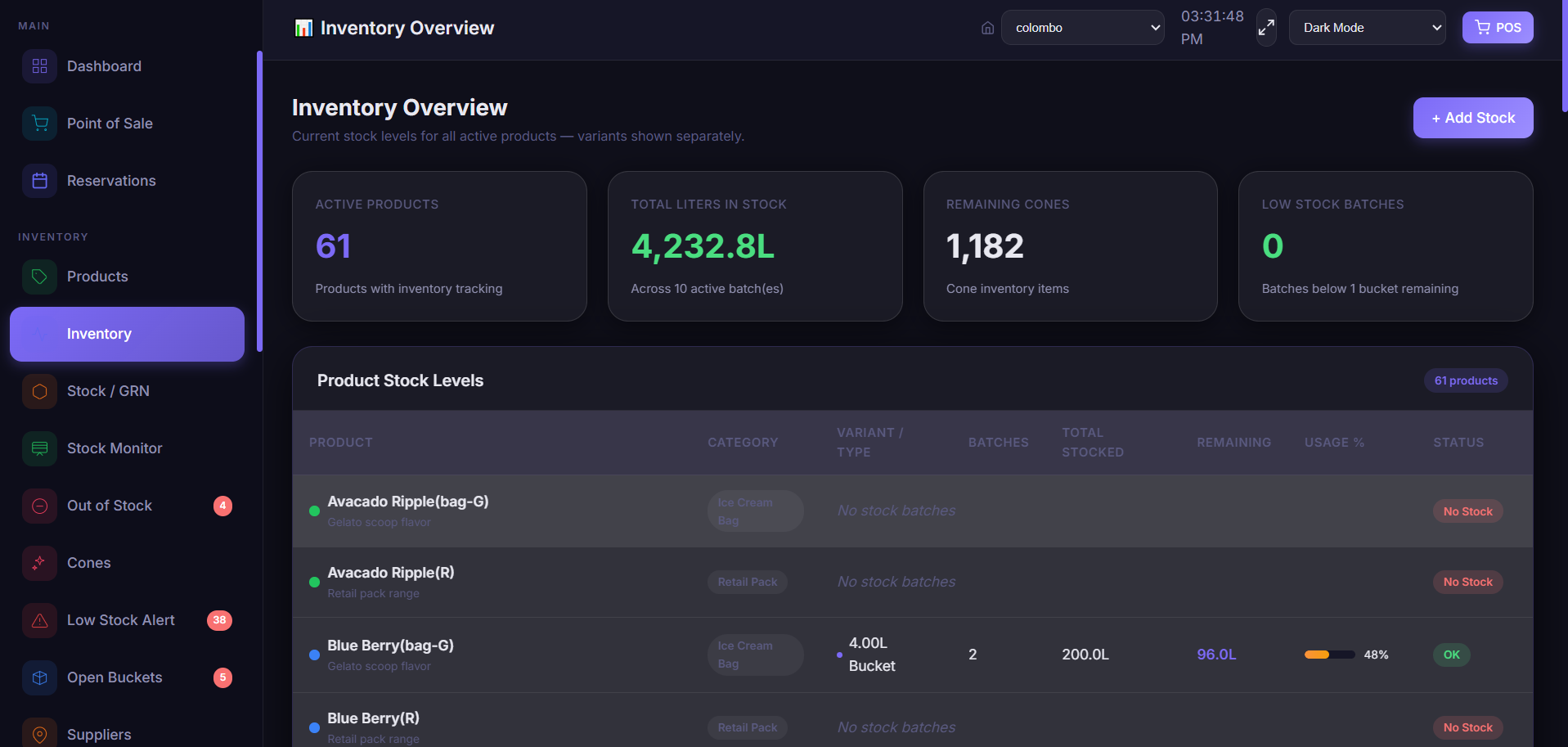
Several pages give managers a clear, real-time picture of stock at each branch and warn them before items run out or expire. The Inventory Overview provides a consolidated product-by-product breakdown of active batches, total stocked volume, remaining liters, and usage percentages.
- 🍦 High-Level Store Metrics: Overview cards for Active Products (61), Total Liters in Stock (4,232.8L), Remaining Cones (1,182), and Low Stock Batches
- 🍦 Product Stock Gauges: Real-time visual usage progress bars and status indicators (OK / No Stock) across all flavor profiles
- 🍦 Fast Stock Replenishment: Convenient '+ Add Stock' shortcut button to immediately record fresh supplier deliveries
Real-Time Live Stock Monitor for Kitchen & Counter Screens
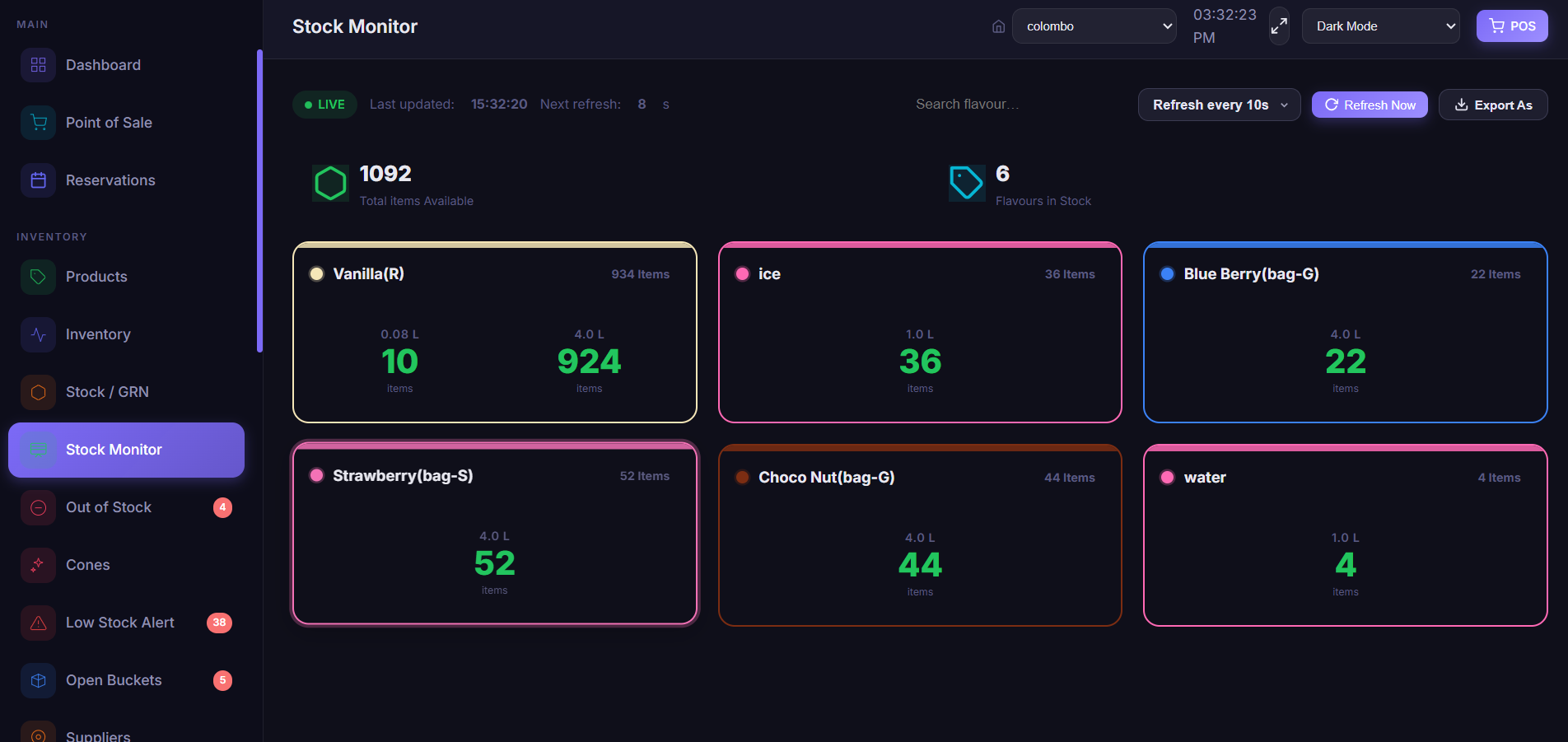
The Stock Monitor provides a high-visibility, large-format flavor board optimized for secondary displays, kitchen prep counters, and store managers. It shows real-time item counts per pack size with automatic background refresh.
- 🍦 Large-Format Flavor Tiles: Vibrant color-coded cards displaying flavor names (Vanilla, Blue Berry, Strawberry, Choco Nut) with live pack counts
- 🍦 Configurable Auto-Refresh: Selectable automatic sync intervals (e.g. refresh every 10s) with live countdown timer and instant refresh button
- 🍦 Flavor Search & Export: Quick search filter to verify flavor availability on busy shifts with export capabilities for inventory audits
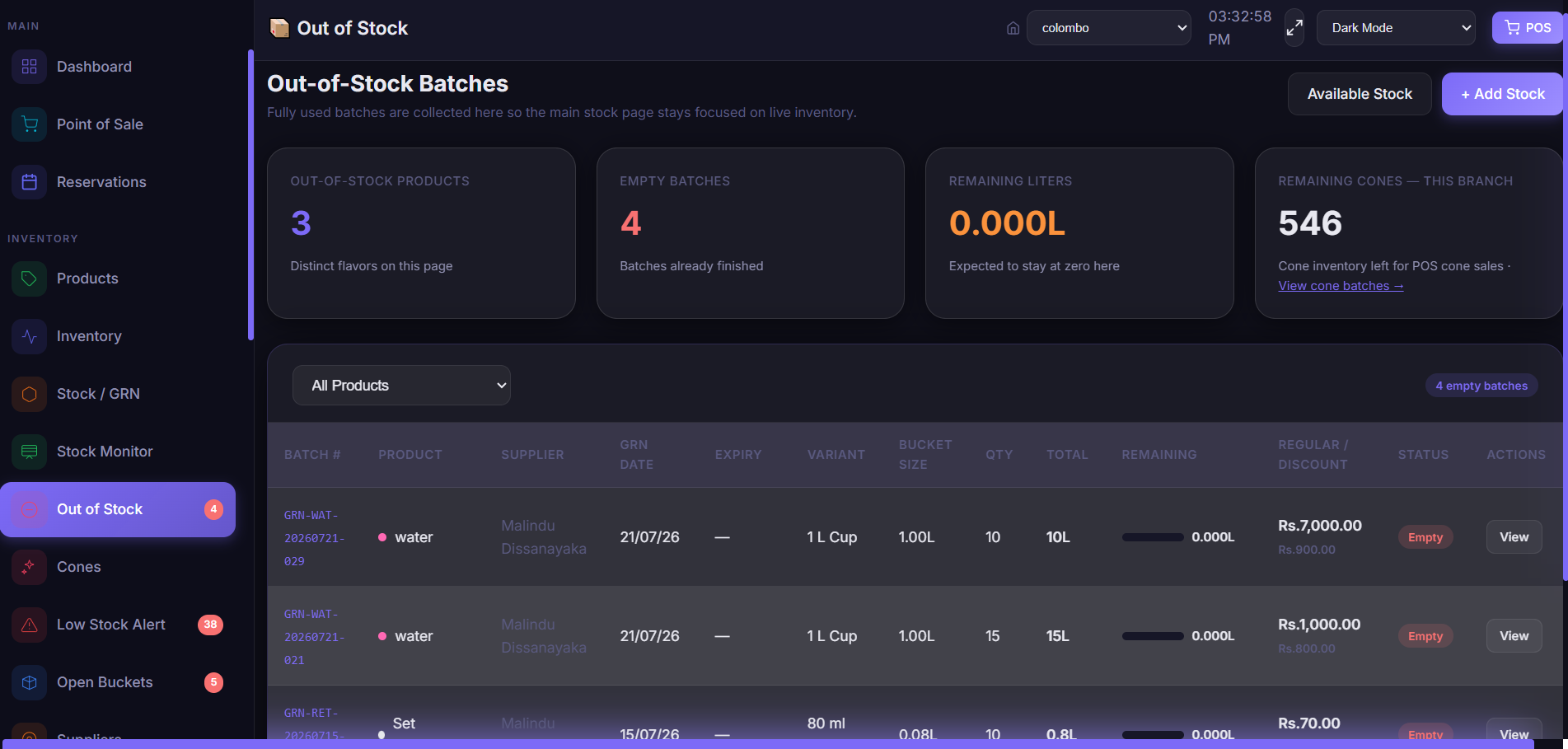
Out-of-Stock Batches Register & Depleted Stock Archive
Lists batches that are fully used up so staff know what to re-order; the count appears as a badge in the sidebar. Moving finished batches to this dedicated screen keeps the primary stock inventory screen clean and focused on active inventory.
- 🍦 Depletion Metrics: Real-time cards showing Out-of-Stock Products (3), Finished Batches (4), Remaining Liters (0.000L), and Cone Reserves
- 🍦 Batch Depletion History: Retains supplier details, initial quantities, total consumed volume, and archived unit pricing
- 🍦 Re-Order Shortcuts: Instant '+ Add Stock' button to quickly re-order depleted flavor lines and restore counter availability
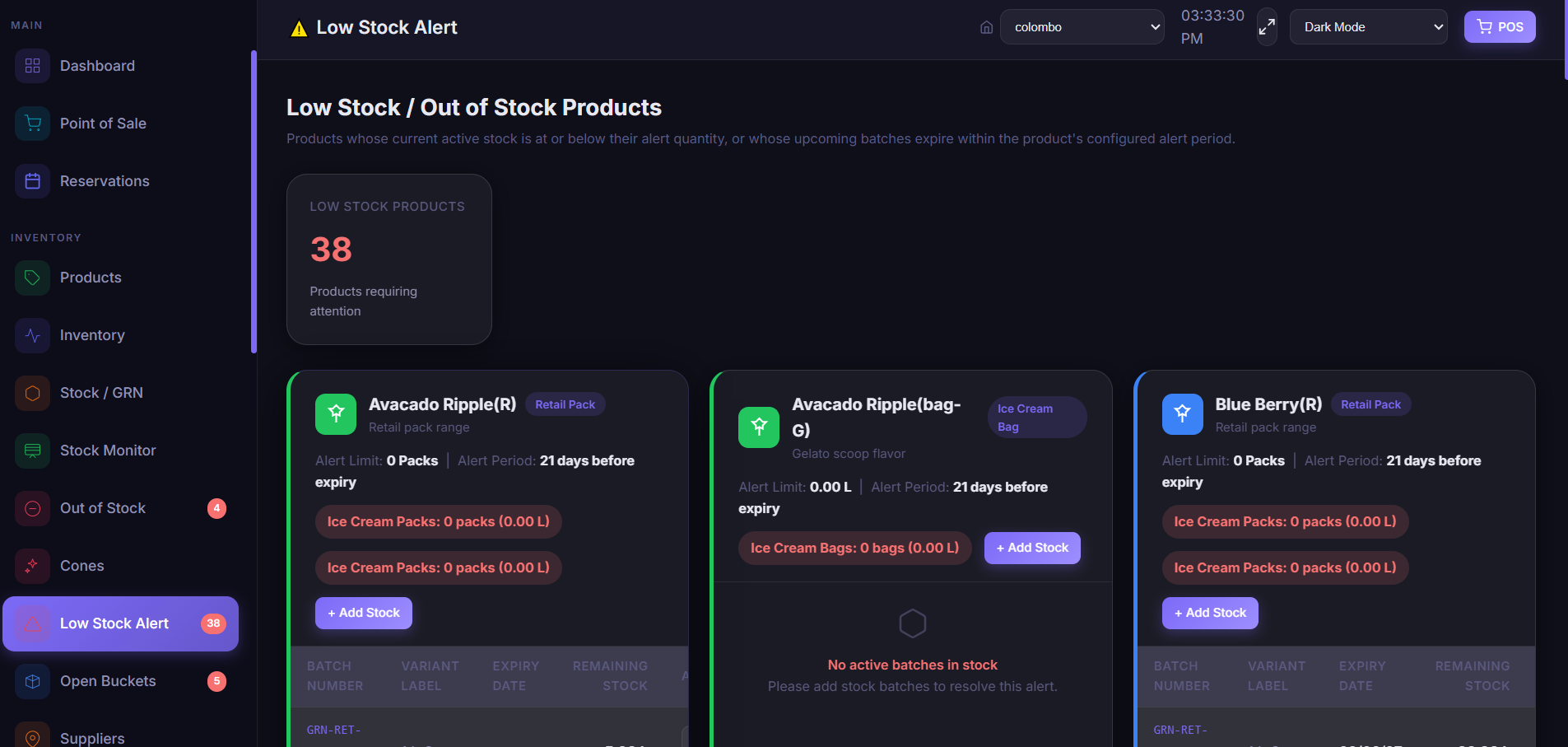
Low Stock Alerts & Batch Expiry Early Warning System
Shows every product whose stock is at or below its alert quantity, or whose batches will expire within the alert period. Each product card shows the alert limit, alert period, current packs / bags, the affected batches (batch number, variant, expiry, remaining) and an "+ Add Stock" button.
- 🍦 Dual Alert Triggers: Flags both threshold volume shortages and batches expiring within the configurable alert window (e.g. 21 days before expiry)
- 🍦 Product Alert Cards: Comprehensive cards showing alert limits, current packs on hand, affected batch numbers, and exact expiration dates
- 🍦 Immediate Restock Linking: Dedicated '+ Add Stock' button on each low-stock card to trigger targeted GRN entries for affected flavors
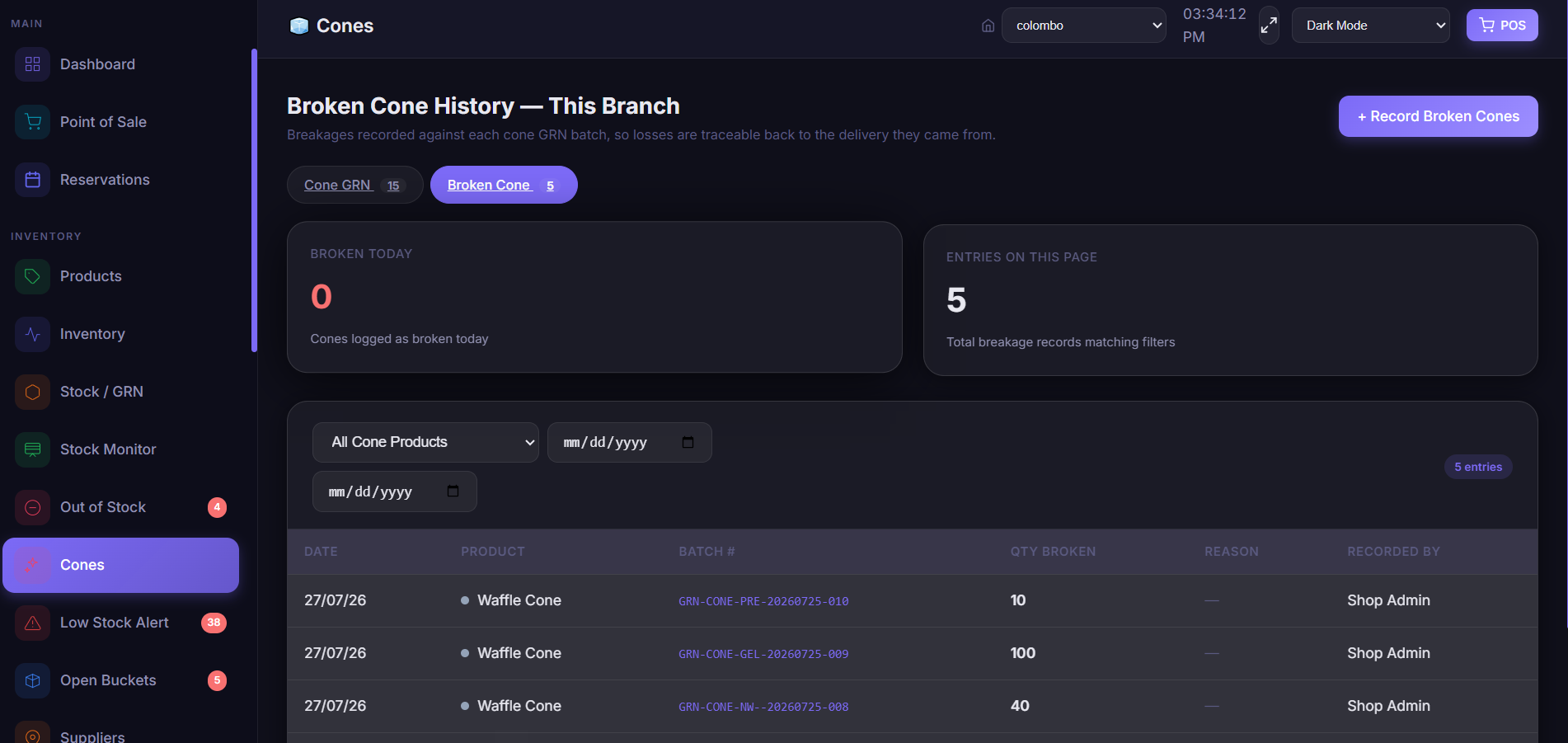
Dual Cone Pools & Broken Cone Breakage Loss Tracking
Scoops are served from bulk ice cream bags. When a bag is opened it becomes an "open bucket" (container) with its own code, and the system tracks what was sold from it and its profit. Cones are tracked separately as their own stock, including breakage.
- 🍦 Waffle & Normal Cone Pools: Separate shared inventory pools for waffle cones and standard cones with batch-level traceability
- 🍦 Broken Cone Recording Modal: '+ Record Broken Cones' function allows cashiers to log cracked, crushed, or damaged cones with reasons
- 🍦 Breakage Audit Trail: Detailed log displaying dates, cone types, source GRN batch numbers, damaged quantities, and recording employee
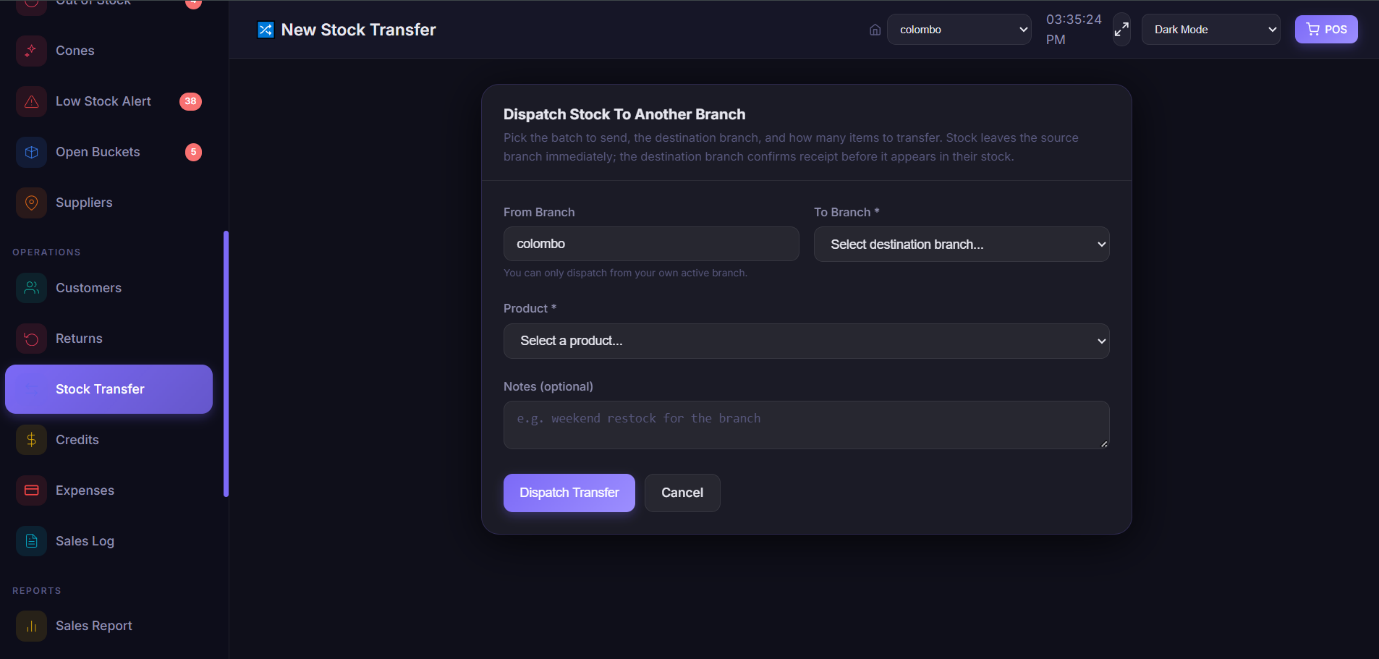
Inter-Branch Stock Transfer Dispatch & Discrepancy Tracking
Stock Transfer moves packaged stock from one branch to another. The source branch dispatches the stock and the destination branch confirms receipt. Stock leaves the source branch immediately but only appears in the destination's stock once received, so stock in transit is never counted twice.
- 🍦 Branch-to-Branch Dispatching: Select source branch, target receiving branch, product batch, transport quantity, and dispatch notes
- 🍦 In-Transit Anti-Duplication: Stock is deducted from the source store immediately while held in transit until confirmed by the recipient
- 🍦 Shortfall & Verification Audit: Receiving branch enters actual quantity received; discrepancies or transport damages are logged automatically
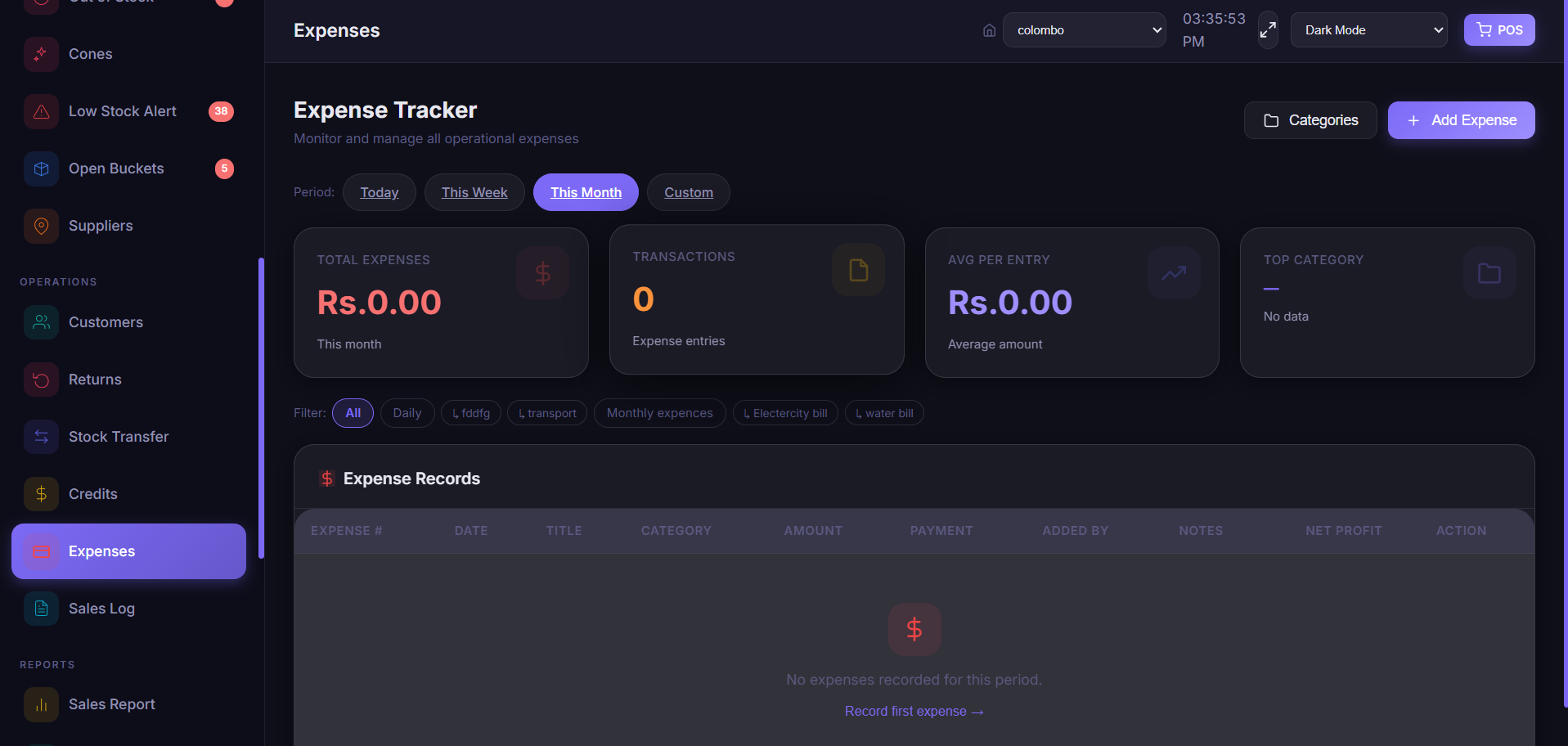
Branch Operational Expense Tracker & Net Profit Deduction
The finance pages track the money side of each branch — operating expenses and customer credit — so cash flow and net profit are visible without a separate accounting system.
- 🍦 Expense Summary Cards: Real-time metrics for Total Expenses (This Month), Expense Transaction Count, Average Entry Cost, and Top Expense Category
- 🍦 Categorized Filter Chips: Filter operational overhead by Daily expenses, Transport, Electricity bills, Water bills, and Monthly expenses
- 🍦 Net Profit Deductibility: Configurable flag per expense entry specifying whether overhead should be deducted in the master Profit Report
Sales, Flavor Breakdown & Gross/Net Revenue Reports
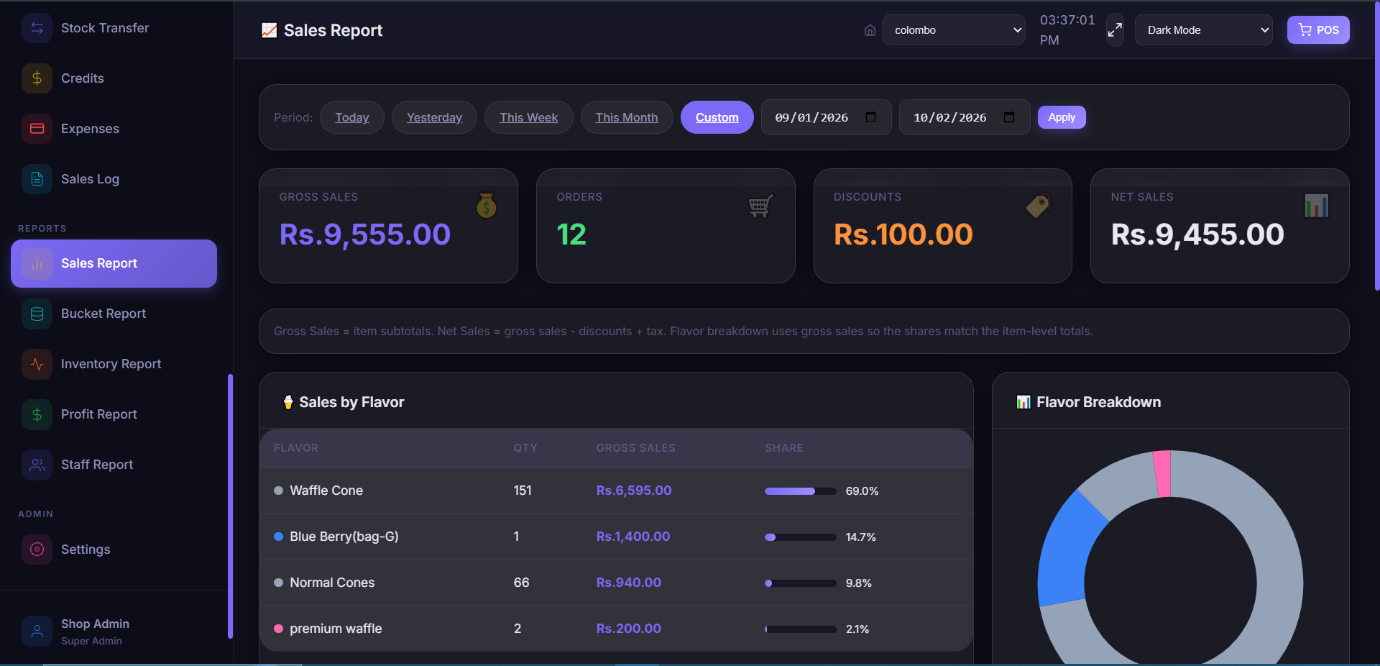
The Reports module turns transaction data into the figures management needs, organised into focused reports. Every report can be filtered by period (Today, Yesterday, This Week, This Month or Custom) and follows the branch selected in the top bar.
- 🍦 Executive Financial Cards: Instant calculations for Gross Sales (Rs. 9,555.00), Orders (12), Total Discounts (Rs. 100.00), and Net Sales (Rs. 9,455.00)
- 🍦 Sales by Flavor Table: Breakdown of total quantity sold, gross revenue, and volume market share % per ice cream flavor
- 🍦 Visual Flavor Breakdown Chart: Multi-color doughnut visualization identifying revenue drivers (Waffle Cones 69%, Blue Berry 14.7%, Normal Cones 9.8%)
Shop Profile, Multi-Branch Setup & Role Access Settings
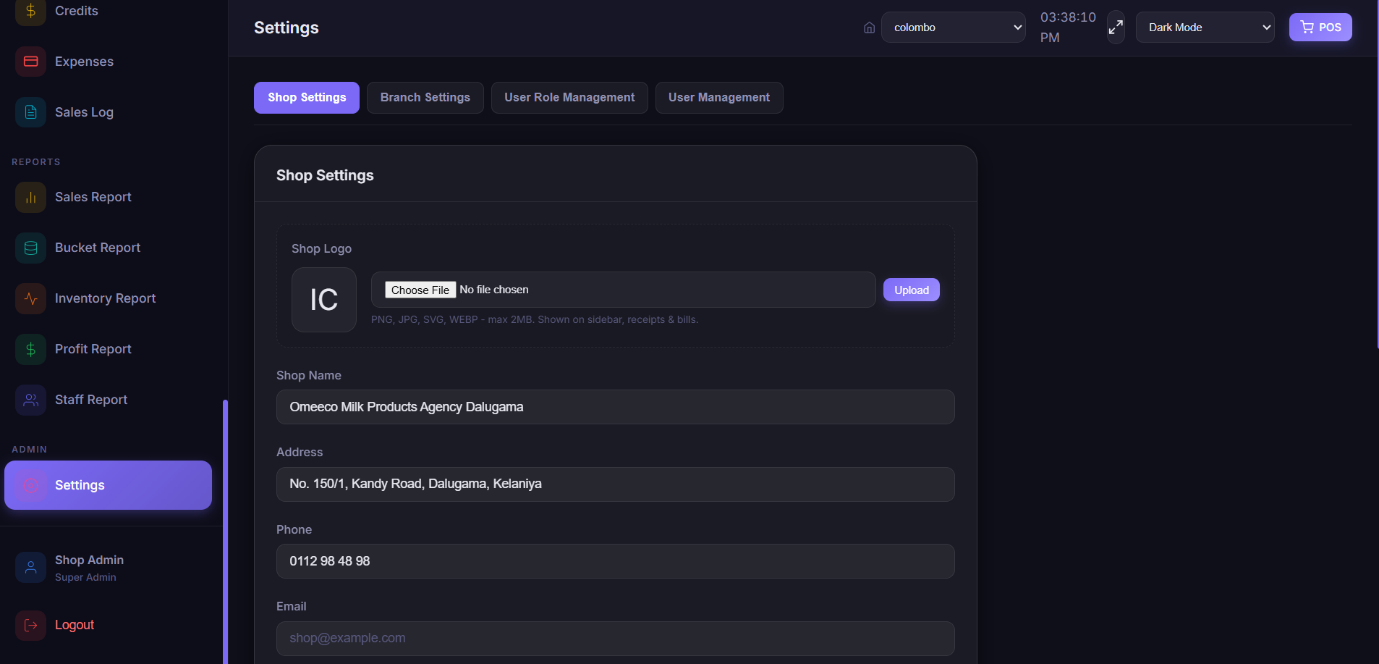
The Settings area (administrators only) is where staff access, branches and the details shown on every receipt are configured. It features four dedicated management tabs: Shop Settings, Branch Settings, User Role Management, and User Management.
- 🍦 Shop Branding & Receipt Customization: Upload parlor logo, set business trade name, store address, hotline, tax rates, and thermal receipt footer notes
- 🍦 Multi-Branch Network Configuration: Add, edit, or configure retail branches with dedicated store managers and inventory pools
- 🍦 Role-Based Permission Matrix: Define cashier, manager, and administrator roles with granular page-level visibility and PIN login credentials
Ice Cream Business Management Suite
Ice Cream POS includes every tool required to scale single parlors or multi-branch gelateria networks.
Touch Checkout & Numpad
Fast scoop billing, quick percentage discounts, cashier PIN keypad login, and on-screen cash numpad.
Open Bucket & Scoop Tracking
Open bulk bags into active buckets, monitor remaining liters, track scoop profit, and close finished containers.
Event Reservation Management
Advance order booking with deposit entry, dispatch dates, stock locking, and overdue payment alerts.
Inter-Branch Stock Transfer
Dispatch stock between branch stores with confirmation audit trails and automatic shortfall logging.
VFD Pole Display & Receipts
COM port customer display integration, thermal receipt printing, and receipt barcode scan-returns.
Flavor & Profit Analytics
Flavor performance charts, net profit calculation, expense categorization, and staff sales reports.
Transform Your Ice Cream Parlor Operations Today
Upgrade your counter billing, open bucket tracking, event reservations, and multi-branch stock dispatches with Ice Cream POS System Sri Lanka.